Vibe coding sounds pretty cool.
Not the name. That’s a bit weird, to be honest. But we ♥ the idea.
Being able to describe an app and watch AI write the code is just…monumentally exciting.
The tough part is knowing where to start. Which apps are the easiest to use? Which ones will actually build something useful? And which ones are going to delete your entire codebase on a whim?
These are all fair questions. And we wanted to know the answers. That’s why we put the key contenders through their paces in October 2025 — and for this 2026 update, we’ve re-verified every price, plan, and product detail.
The short version: vibe coding means describing the software you want in plain language and letting AI write the code. In our testing, Cline and Claude Code tied for the top score (59.5/70), Cursor is the strongest all-rounder, and Lovable and v0 are the picks if you never want to touch code.
Stick with us for the deep dive: what we built, how we did it, and where every tool landed.
The AI website builder that turns conversation into designer-level sites. Free with hosting.
Start Free Trial
Testing the top vibe coding tools: October 2025 tests, 2026 update
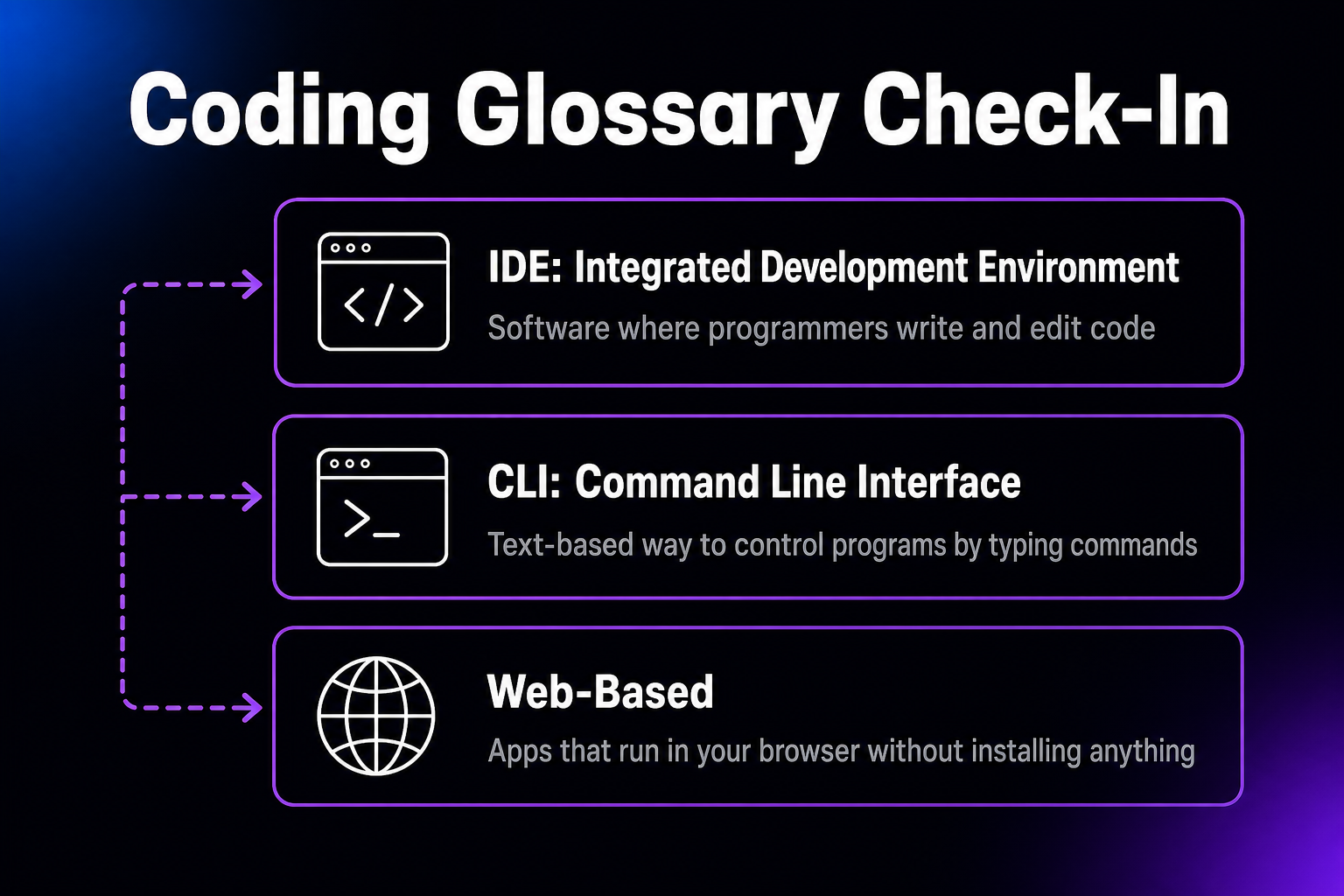
Comparing vibe coding tools can be a challenge, because they come in many flavors:
- IDE plugins: These tools act as a bridge between AI models (like Claude and ChatGPT) and your IDE workflow.
- IDE forks: These apps replace your existing IDE, with AI features built in. Most try to get you on a subscription.
- CLI-based tools: Happy to work in the command line? These tools are made for this environment.
- Web-based platforms: User-friendly web apps that let you create software right in your browser.
So many choices. But don’t worry, we’re going to make some sense of this AI tasting board.
The DreamHost testing rubric
To make it fair, we’ve created our own scoring system. It goes something like this:
- First pass execution (0–10): How well does the platform translate your initial prompt into working code?
- Error recovery (0–10): How effectively does the platform handle bugs and errors?
- Iteration capability (0–10): How well does the platform handle follow-up changes and adjustments?
- User experience (0–10): How intuitive is the platform, both for developers and for non-technical people?
- Deployment (0–10): Can you deploy directly from the platform, and is the generated code ready to ship?
- Prompting efficiency (0–10): How many prompts are required to achieve the desired outcome? And how deep do those prompts need to be?
- Value for money (0–10): Free tier limitations and restrictions, pricing model fairness, and overall bang for your buck.
And how are we qualified to score this contest?
Well, DreamHost provides hosting for many top apps, websites, and agencies. We know good code when we see it.
Check out the results under each tool to get the at-a-glance verdict.
IDE plugins: add vibe coding to your normal workflow
If you’re technical enough to know what an IDE is, you might want to start vibe coding with a plugin. These solutions are fast, flexible, and fairly low-cost.
The only downsides: you need to configure (and pay for) your own API key, and most plugins are made for VSCode. If you use a different IDE, you might be out of luck. (Already paying for GitHub Copilot? Its agent mode now plays in the same space, but the extensions below are purpose-built for vibe coding and support far more models.)
1. Cline (VSCode/Cursor/Devin Desktop extension)
Testing Score: 59.5/70
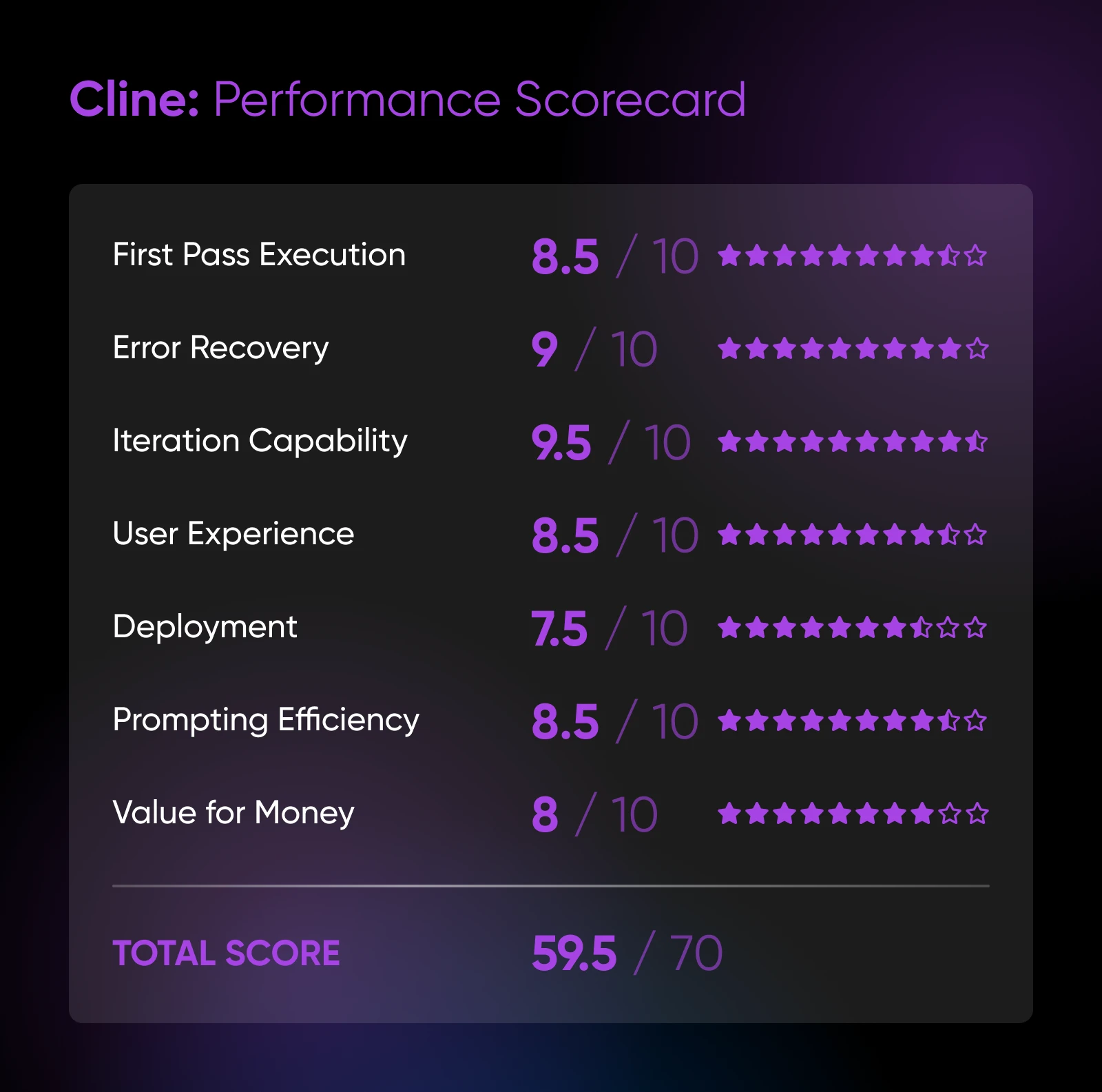
Cline is like the perfect intern: it always makes a plan, asks smart questions, and works hard without rewriting your entire repository.
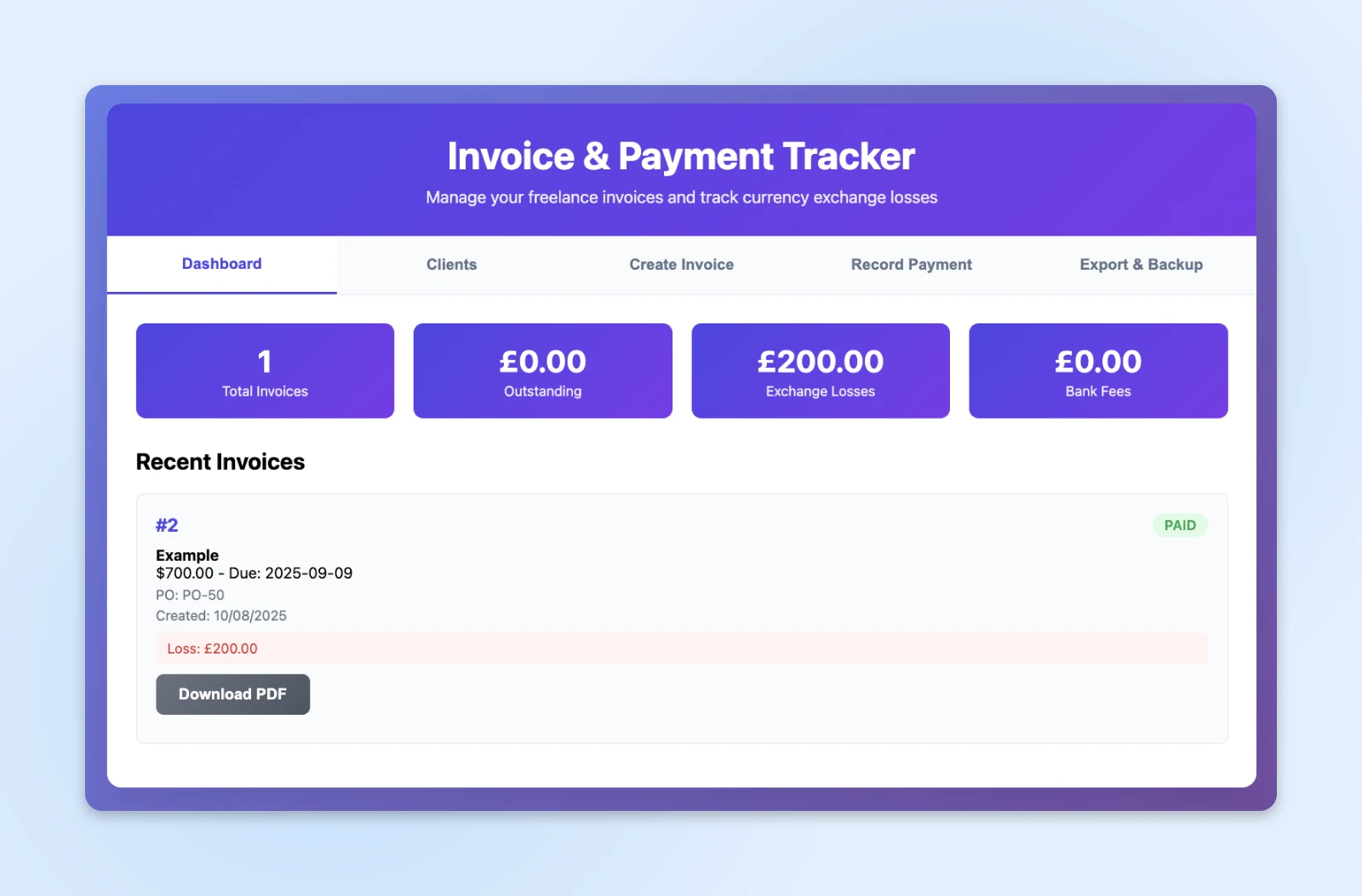
In testing, Cline performed respectably on the first pass. We had it build an invoicing system; the plugin delivered clean code with no fuss (thanks in part to Claude running under the hood).
But the real strong point of this plugin is iteration. Cline’s strategic approach helps it tackle errors logically.
Enable autonomous mode, and the plugin can work in the background while you do other things. Just make sure to check in once in a while, or you’ll burn through a hell of a lot of AI credits.
Pros:
- Strong planning, and asks clarifying questions.
- Supports multiple AI providers.
- Autonomous mode can handle complex, multi-file tasks.
Cons:
- Can rack up API costs quickly.
- Sometimes guilty of over-engineering.
- Occasional lag with large codebases (>10,000 files).
Pricing: Free; you just pay for API usage.
2. Roo Code (VSCode extension)
Testing Score: 57/70
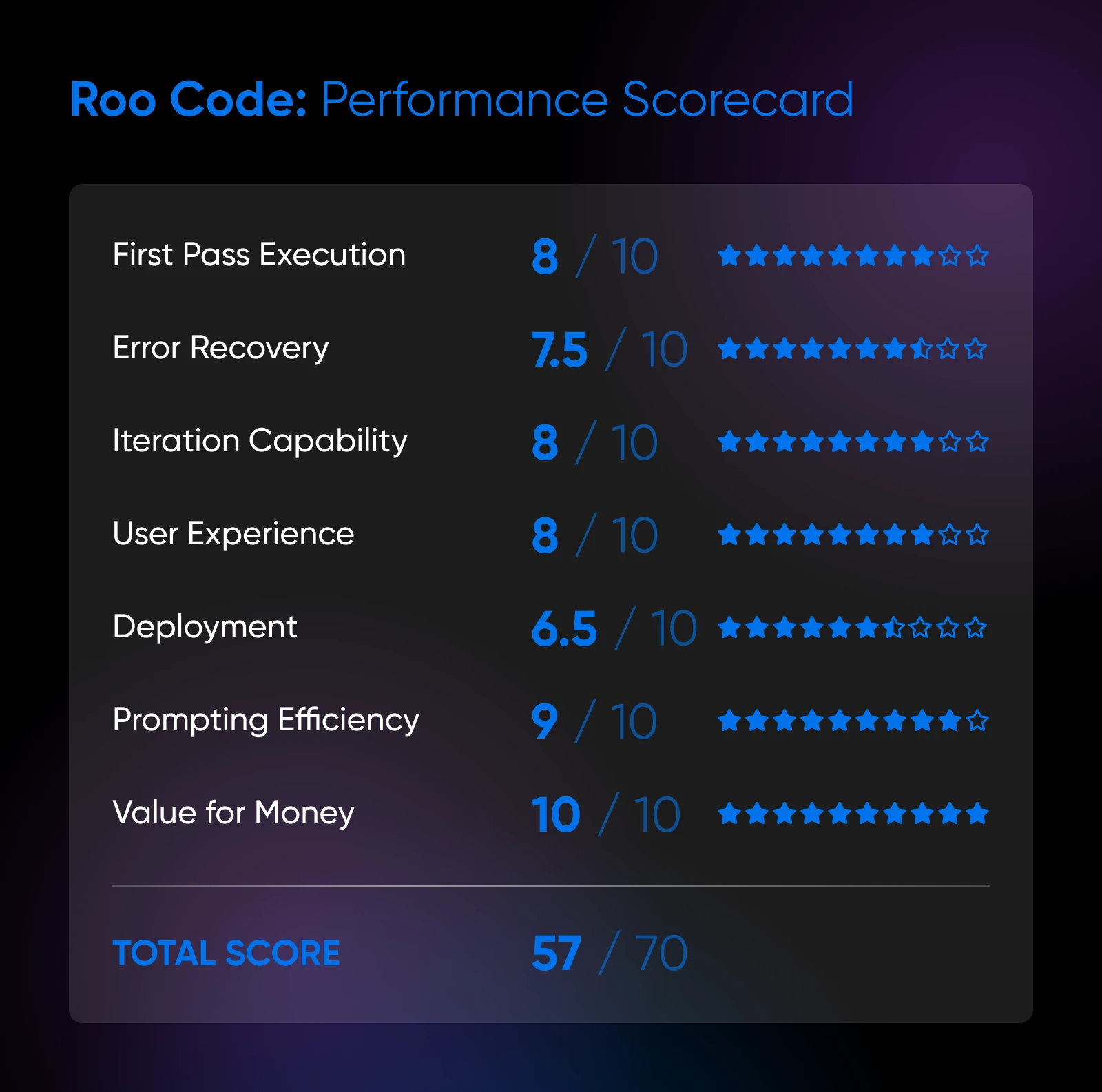
There’s nothing very glamorous about Roo Code. It’s an open-source extension that makes no outlandish promises. But boy, it does the boring stuff well.
Roo Code is particularly good at handling projects that require multiple files. The extension tracks context well, and it offers several specialized modes. It’s super customizable, too.
The quality of the code you receive largely depends on what you’re trying to achieve.
If you’re working with one or two popular languages, Roo Code will excel.
Need your agent to think outside the box and work within frameworks? Cline feels slightly more agile.
But overall, there’s not much separating these two (entirely free) extensions.
Pros:
- Excellent project-wide context awareness.
- Loads of customization options.
- Fast response times, even with complex queries.
Cons:
- Sometimes overeager to refactor if your prompts are broad.
- Error explanations are concise but not always root-cause-first.
- The DIY deploy path is hard for non-technical users.
Pricing: Free; you pay for API usage.
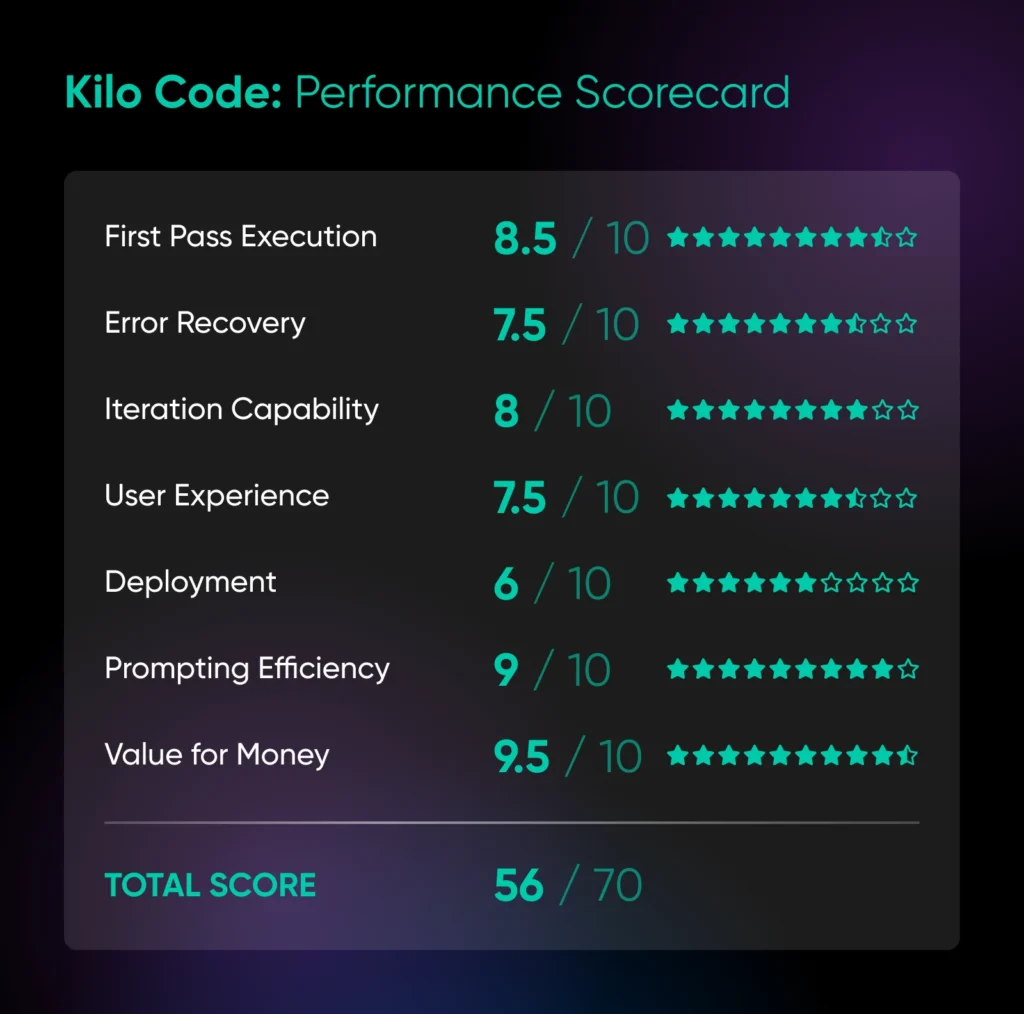
3. Kilo (VSCode/Cursor/JetBrains extension)
Testing Score: 56/70
Kilo (formerly Kilo Code, and now part of Anaconda) is essentially the lovechild of Cline and Roo Code.
It’s actually a direct fork of Roo Code — so you’ll find most of the same functionality here. But the developers have built Cline-like features on top, including simple setup and auto-acceptance.
In action, Kilo feels slightly rougher around the edges than Cline. That’s forgivable — at the time of our October 2025 test, the app was only months old.
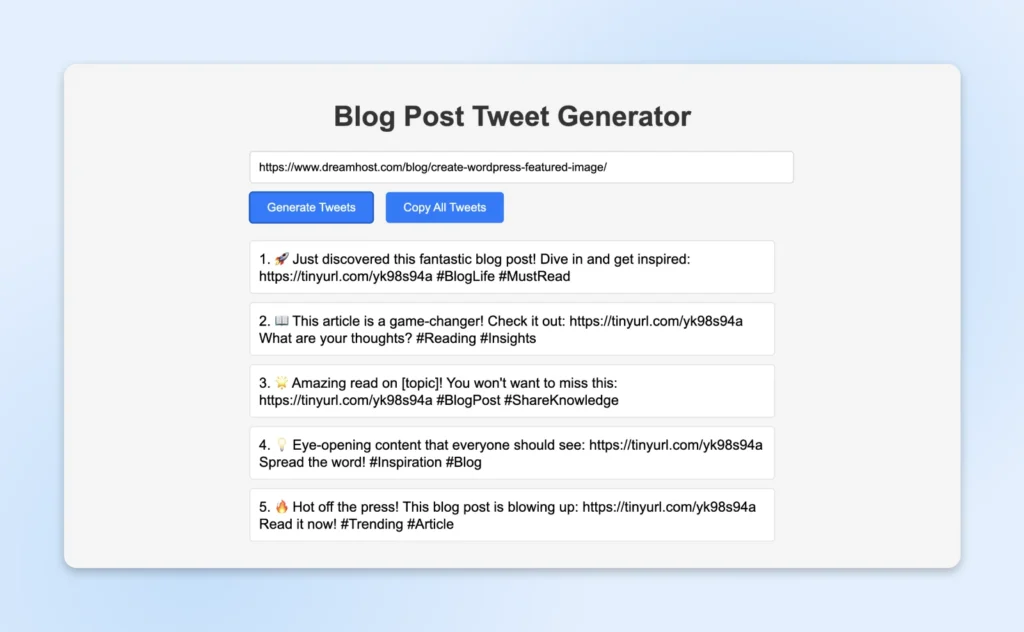
And the extension smashed our one-shot test, creating a fully functional blog-to-tweet converter in seconds, using the free credits that Kilo offers to new users. Impressive stuff.
Pros:
- The feature list offers the best of both worlds.
- Great for scoped edits and UI polish.
- Low learning curve; stays out of your way.
Cons:
- Still feels slightly beta-ish.
- Not the smoothest setup.
- Deployment is very DIY.
Pricing: Free for individuals; Teams plans from $15/user/month.
IDE forks: environments made for vibe coding
Why mess around with plugins when you can just grab a free IDE with AI built in?
That would be the pitch for IDE forks. And plenty of people seem to be buying.
Let’s see what the fuss is all about.
4. Cursor
Testing Score: 57.5/70
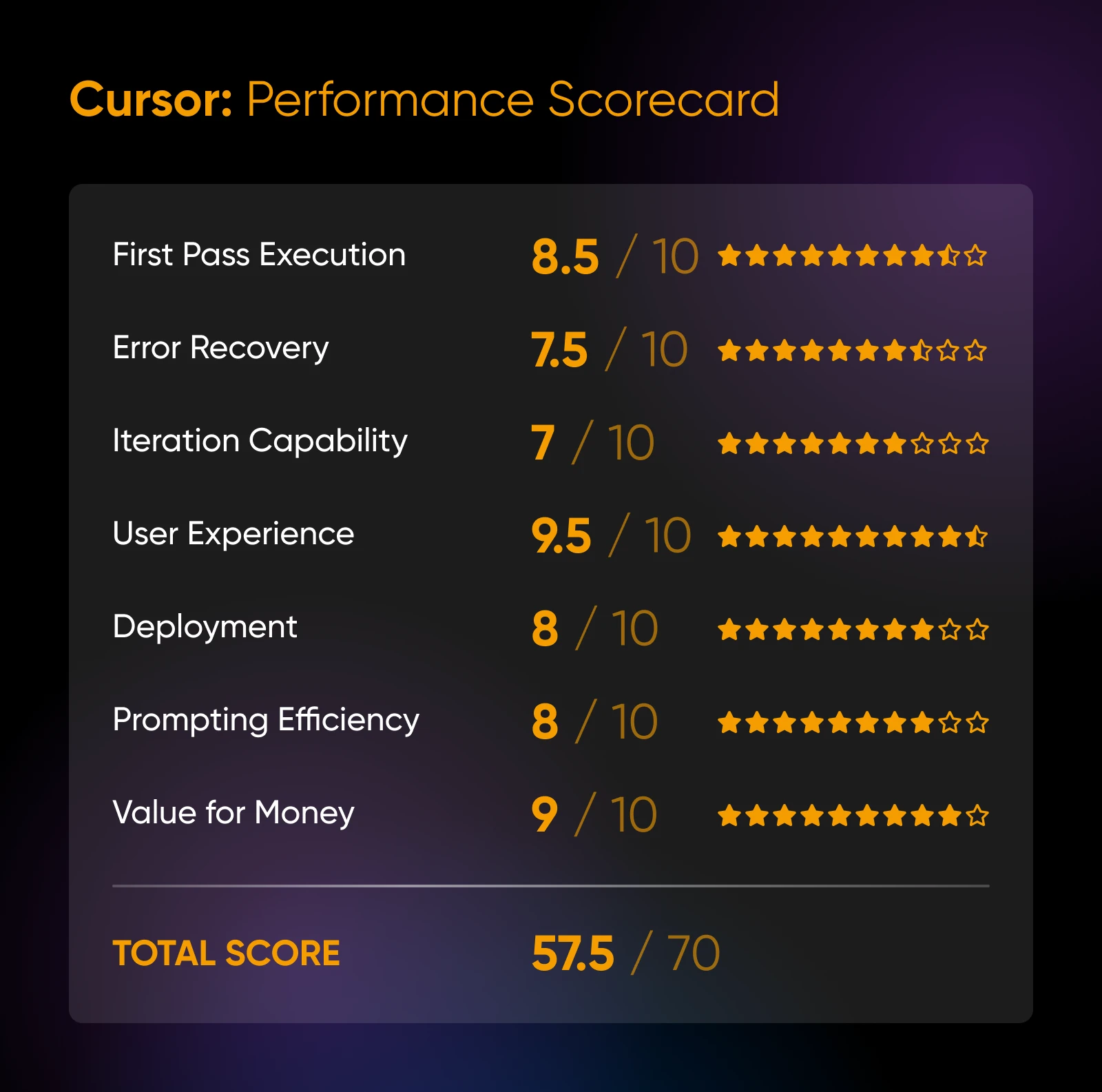
The OG of vibe coding. Cursor is still the most popular AI coding tool in 2026 (it leads BuildMVPFast’s April 2026 ranking of the category) and for good reason.
This IDE makes it super easy to start building apps. You don’t need an API key. Just install the desktop app and start making requests.
On the free Hobby plan, you get limited Agent requests and access to Composer, Cursor’s in-house model (per cursor.com, August 2026). For frontier models, paid plans start at $20/month.
For that price, you get way more requests than you would with API pricing. And the app is super easy to use.
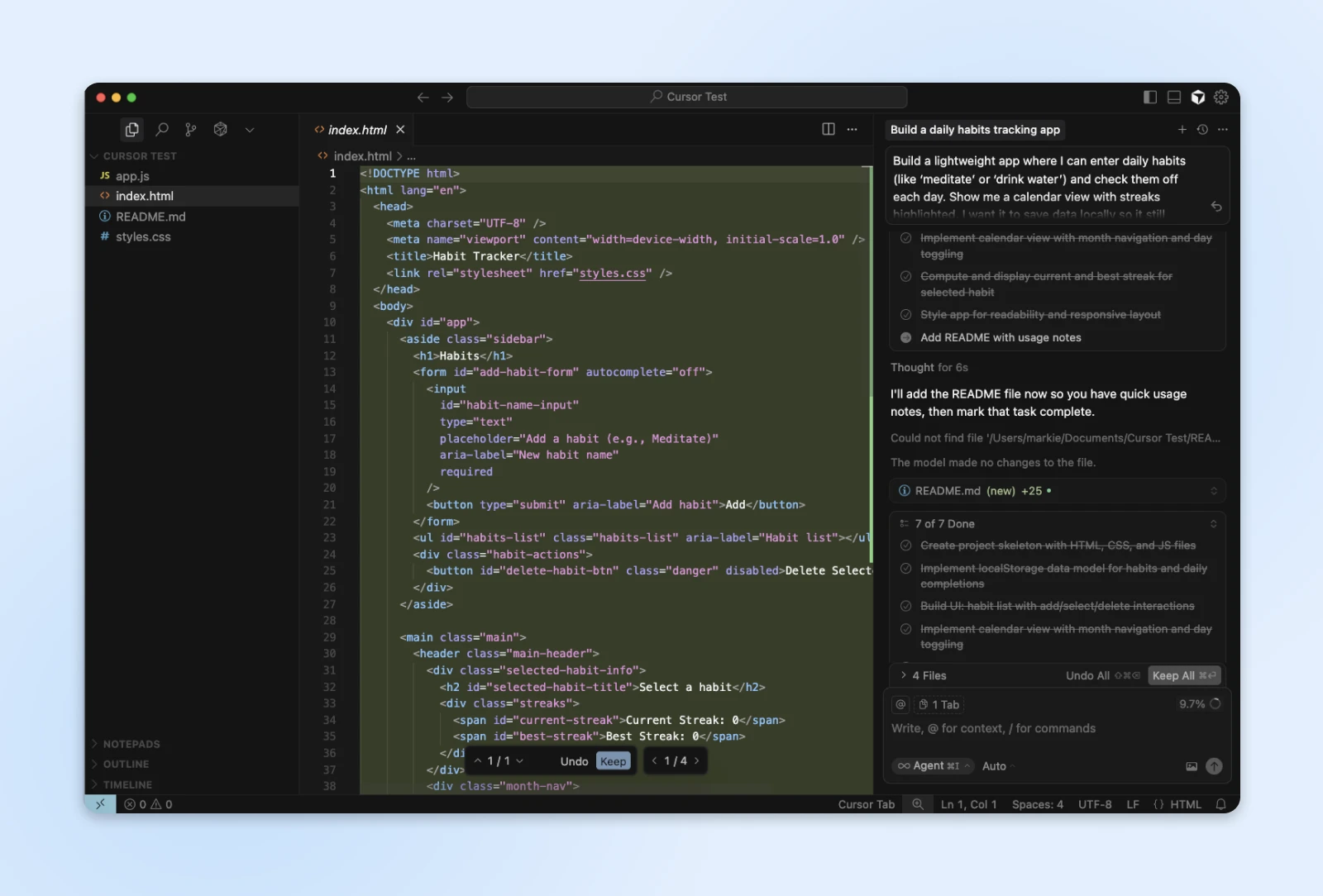
The major drawback is that Cursor isn’t quite as smart as BYOK (bring your own key) tools like Cline.
In testing, it handled a simple habit tracker in one shot — but the app sometimes needs help to stay on track during long vibe coding sessions.
Pros:
- Great interface, with access to AI for inline edits.
- Strong repo-wide changes with minimal regression.
- Fast and cheap.
Cons:
- Requires a subscription to access frontier models.
- Long sessions benefit from a manual recap to avoid drift.
- Agent power users may need the higher-priced Ultra tier.
Pricing: Free to try with limited features; paid plans from $20/month.
5. Devin Desktop (formerly Windsurf)
Testing Score: 56.5/70
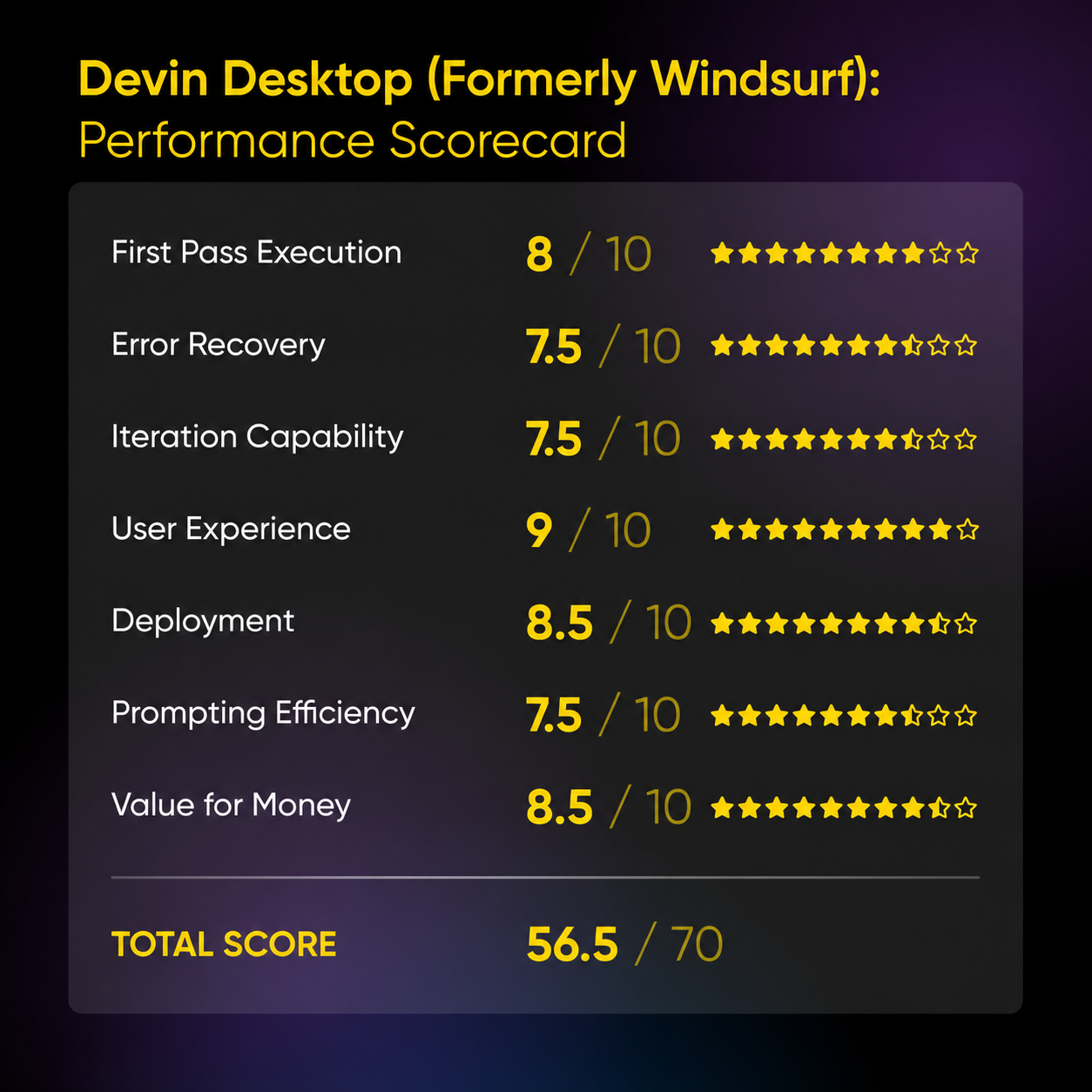
First, some housekeeping: we tested this editor in October 2025, when it was called Windsurf. On June 2, 2026, Cognition renamed it Devin Desktop, and windsurf.com now redirects to devin.ai. Same editor, new badge; the scores here reflect the product we tested.
Devin Desktop is Cursor’s cheeky younger sibling. While it’s still growing and developing, there’s already plenty to like.
One big point of difference is access to models. At the time of our test, the app offered free access to the in-house SWE-1 model, which wasn’t bad. The in-house line has since moved on to SWE 1.7, with free usage included on the $20/month Pro plan (per devin.ai, August 2026) — and you’ll need that paid plan if you want frontier models from Claude, OpenAI, or Gemini.
Aside from this (fairly large) hiccup, the app is very user-friendly. It automatically scans existing codebases and tags all the key ingredients, meaning you can get to work faster. It even learns your coding style over time.
We also like the “App Deploys” feature, which lets you deploy web applications directly from the built-in Cascade agent. That’s a big plus for the non-techy people.
Pros:
- Speedy, even with large codebases.
- Easy to use for non-developers.
- Learns what you like.
Cons:
- Outputs can get a little wordy.
- Occasional hesitation if you’re not specific with prompts.
- Plans aren’t overly generous with credits for top models.
Pricing: Free plan available; Pro from $20/month (per devin.ai, August 2026).
CLI-based tools: vibe coding in the command line
For the average computer user, the command line feels dangerous. Type the wrong thing and you could easily delete your computer…or something.
But for seasoned developers, the command line is quite simply the most efficient tool for getting things done.
And that’s why some AI coding tools are made for this environment — Anthropic’s Claude Code, OpenAI’s Codex CLI, and the open-source OpenCode all live here. We put two of them through the rubric:
6. Claude Code
Testing Score: 59.5/70
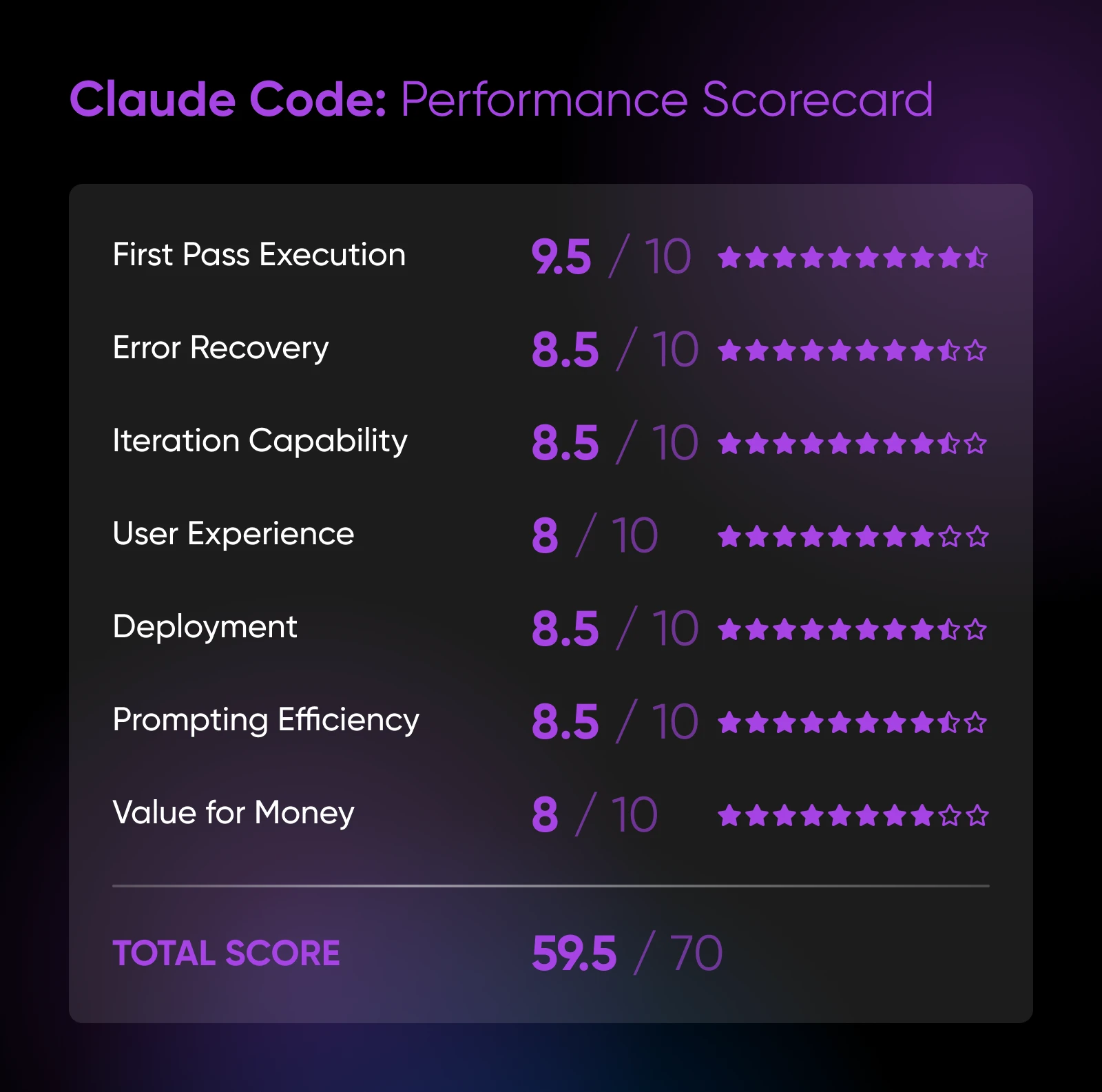
Say hello to the GOAT of reasoning. Holy cow, this thing is smart.
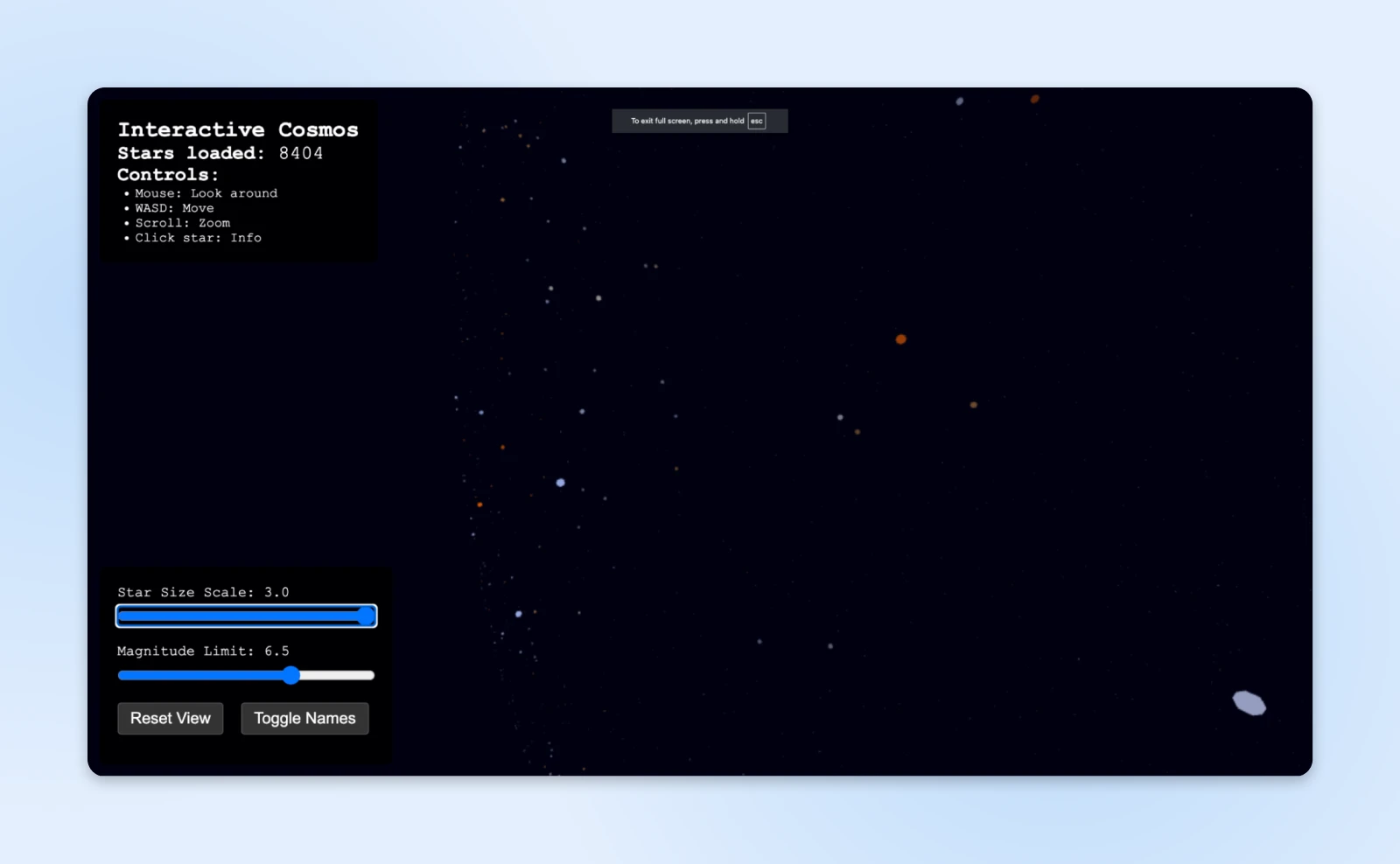
Whether you’re building a game of tic-tac-toe in Python, or creating an interactive galaxy in Three.js using star catalog data found in a JSON file — yes, we tried that — Claude Code outputs great code. It’s speedy, too.
Claude Code works equally well on existing codebases, and the fact that you’re tapping directly into the shell means you can even use it for “vibe scripting”…if that’s a thing.
So, why isn’t this tool top of the pile? The interface. You live in a terminal, with no visual preview of what you’re building (although you can run Claude Code inside your favorite IDE). Context isn’t the problem: Anthropic’s docs say it understands your entire codebase, and it makes multi-file edits happily.
Pros:
- Exceptional natural language understanding.
- Works well over SSH.
- BYOK or get a massively generous subscription.
Cons:
- Locked to Anthropic’s Claude models.
- No visual feedback or preview.
Pricing: Pay as you go via API credits, or get it included with a Claude Pro subscription from $20/month ($17/month billed annually); Max plans for heavy users start at $100/month.
7. OpenCode
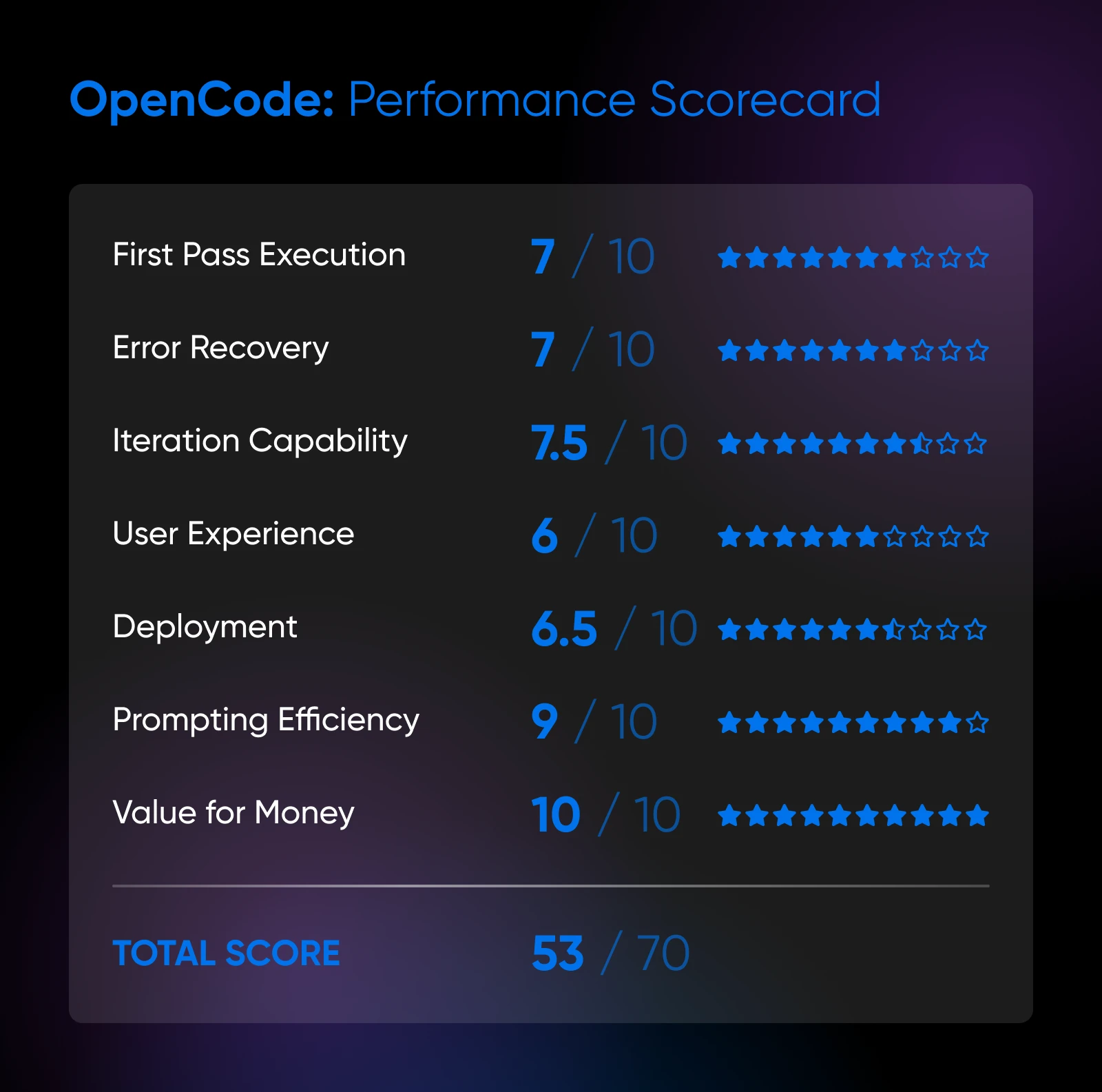
Testing Score: 53/70
Whereas Claude Code is entirely locked into one platform, OpenCode is the opposite.
This command-line agent actually supports more than 75 different AI providers, including all the big names. You can even switch between models, mid-conversation.
The flexibility doesn’t stop there. You can use OpenCode in any IDE, hook it up to GitHub, configure specialized agents, and more.
Remember, though, we’re talking about a CLI tool here. So, you’ll need to be comfortable setting up all these options by hand. You’re not going to find a pretty GUI here.
But hey, OpenCode is completely free. You only pay for the credits you use on your chosen AI model.
Pros:
- Supports 75+ AI providers, with BYOK.
- Totally free to use.
- Loads of customization options.
Cons:
- Configuration is complicated and takes forever.
- The quality of the code depends entirely on your setup.
- You need to be very confident in the command line to use this thing.
Pricing: Free (with BYOK API costs).
Web-based platforms: user-friendly vibe coding
Our final category is a beauty. Literally.
Web-based platforms aren’t always the most capable, but they’re very pretty and enjoyable to spend time with. Definitely worth a second date.
8. v0 (Vercel)
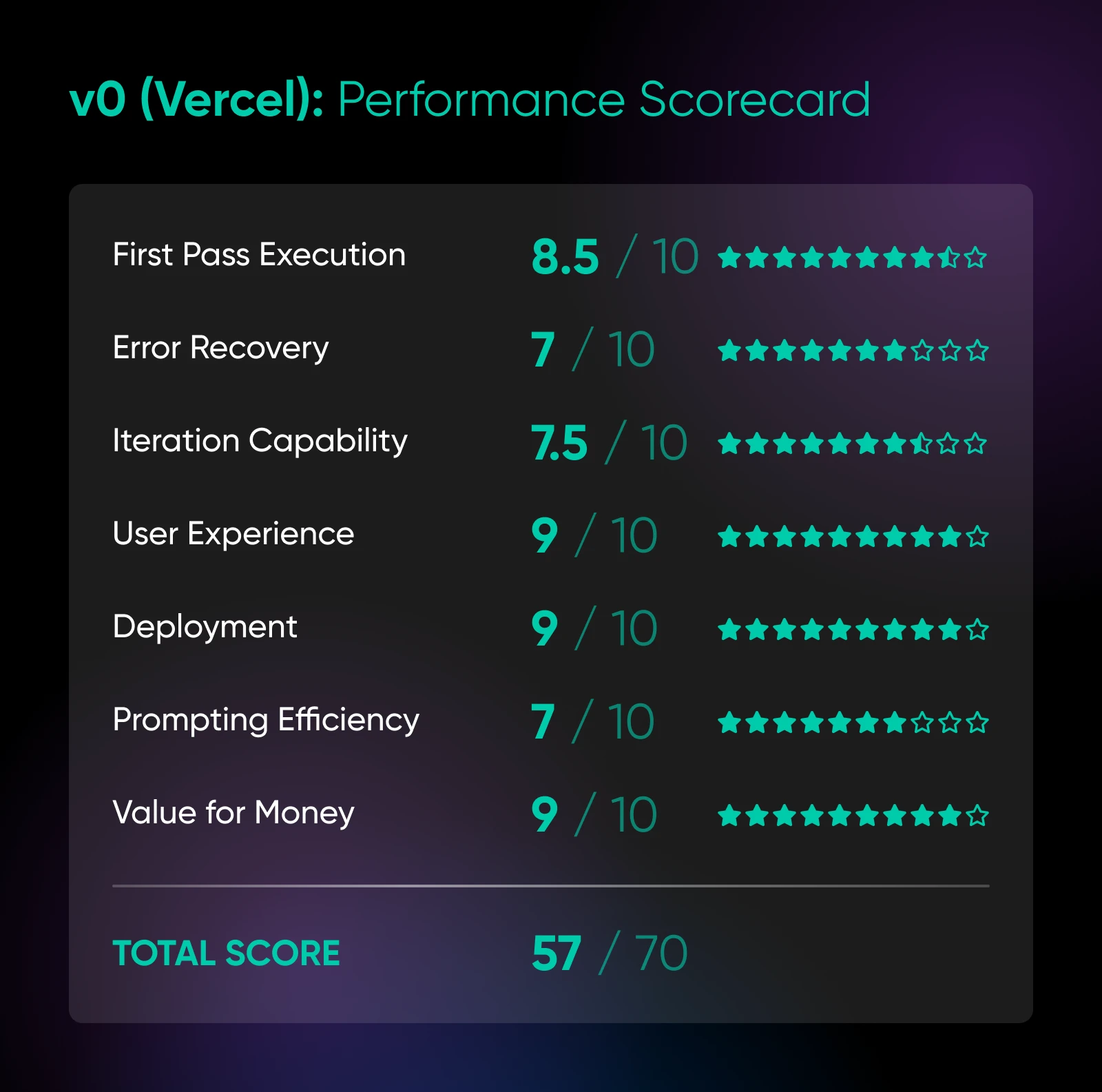
Testing Score: 57/70
A fun fact: Vercel created and maintains Next.js, the popular React framework, and employs several React core contributors.
So, it’s no surprise that v0 — Vercel’s AI assistant — is made for building interfaces.
This tool is clearly aimed at folks who want to prompt more than code. The app is entirely based around chat, with a preview window to see what you’re cooking.
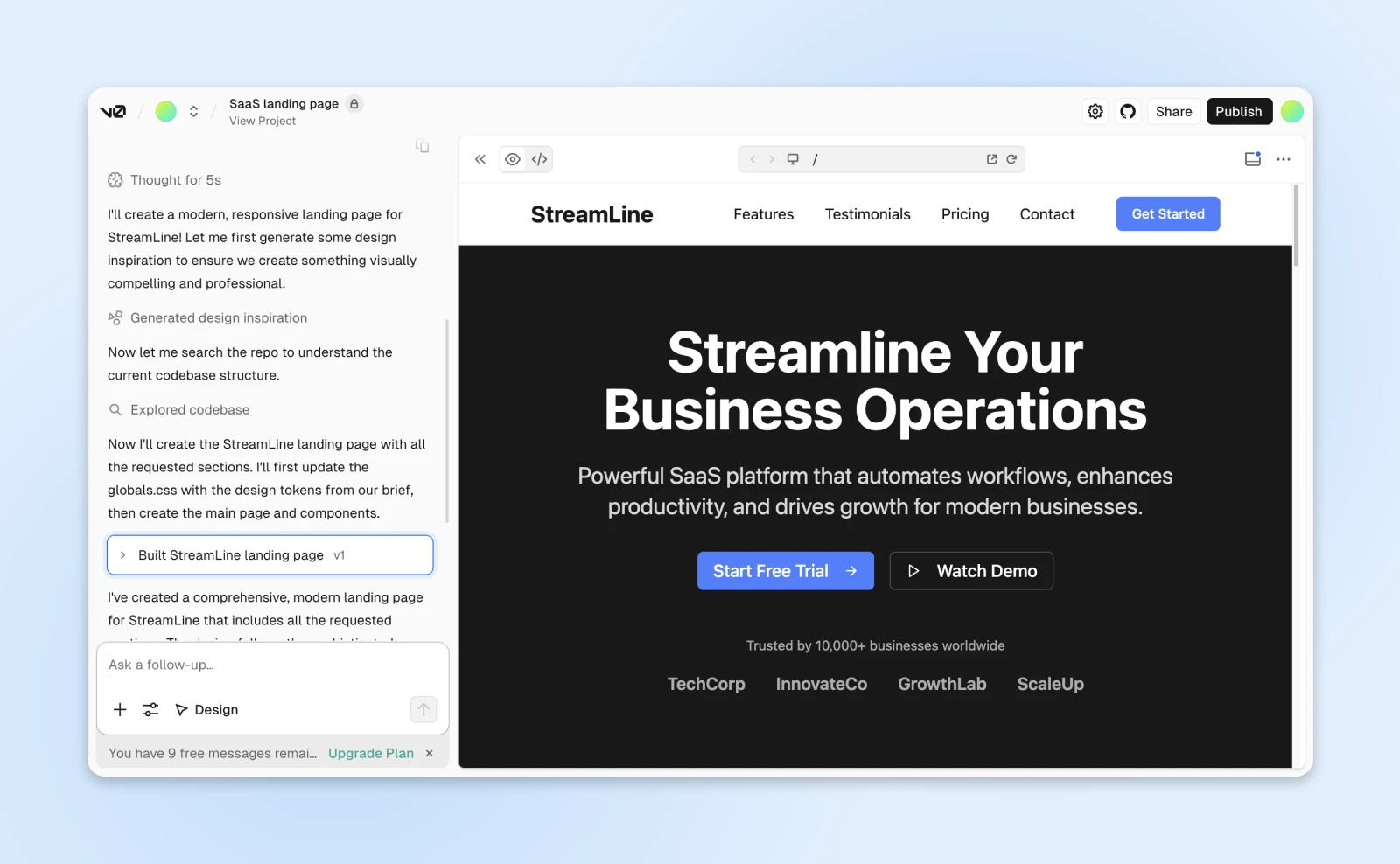
If you want more control, you can edit the code by hand or use the built-in controls to change your design.
The outputs are modern, responsive, and stylish (we built a nice landing page). In our October 2025 test it stayed firmly in frontend territory, though v0 now pitches full-stack apps as well (as of August 2026).
Pros:
- Super easy to use.
- Generates beautiful, modern UI components.
- Direct Vercel integration for deployment.
Cons:
- Frontend/UI is the sweet spot; its newer full-stack features weren’t part of our test.
- Requires Tailwind CSS knowledge for customization.
- Can’t handle complex application logic.
Pricing: Free plan with $5 of monthly credits (7 messages/day); paid plans from $30/user/month.
9. Lovable
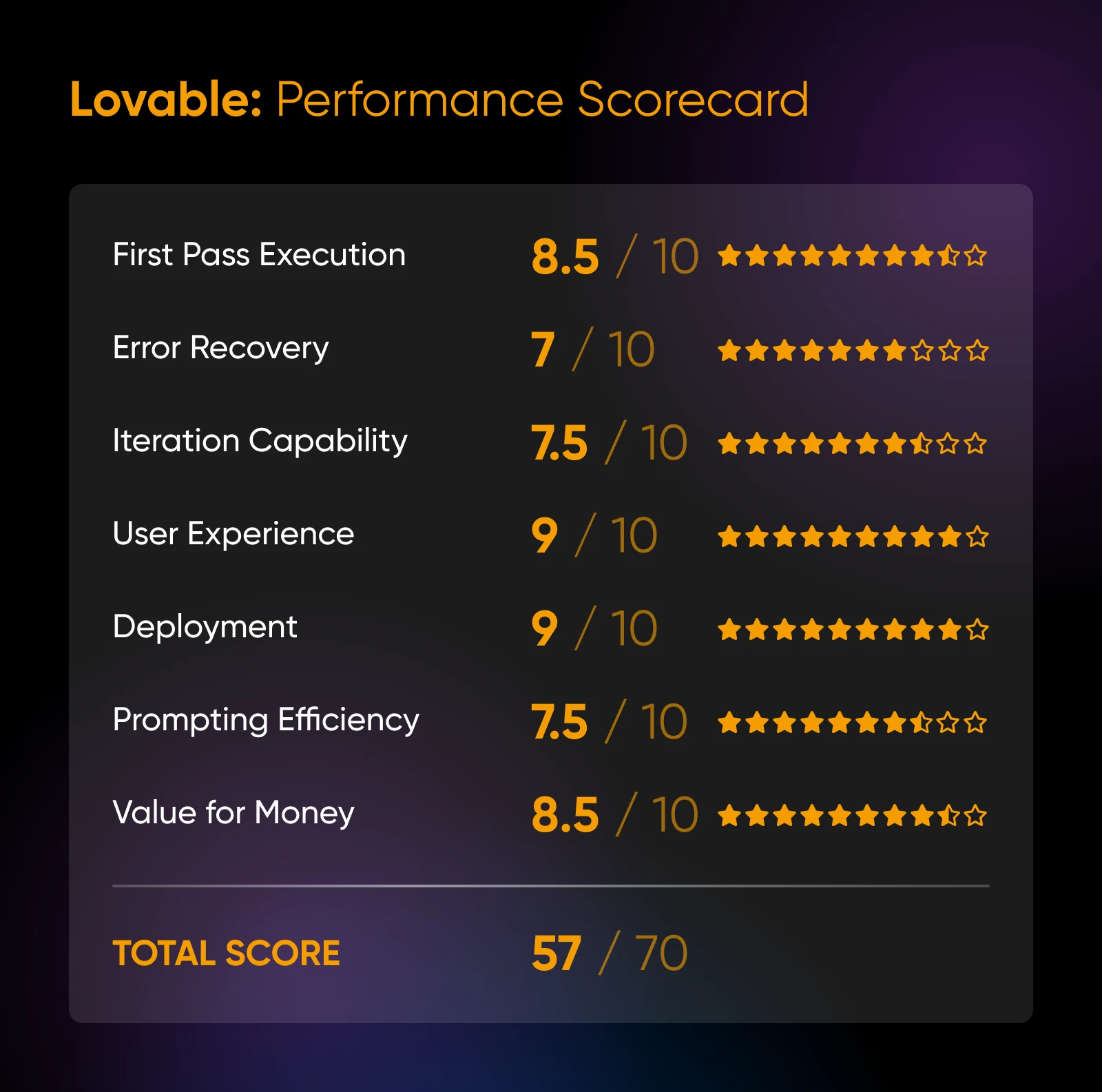
Testing Score: 57/70
Lovable promises to build entire applications from a single prompt. And shockingly, it often delivers.
If you’re coming straight from v0, the workflow will feel very familiar. You chat with the app on the left, and preview on the right.
With a clear prompt, Lovable serves up a great first impression. We created a simple task manager complete with a dashboard and full user management.
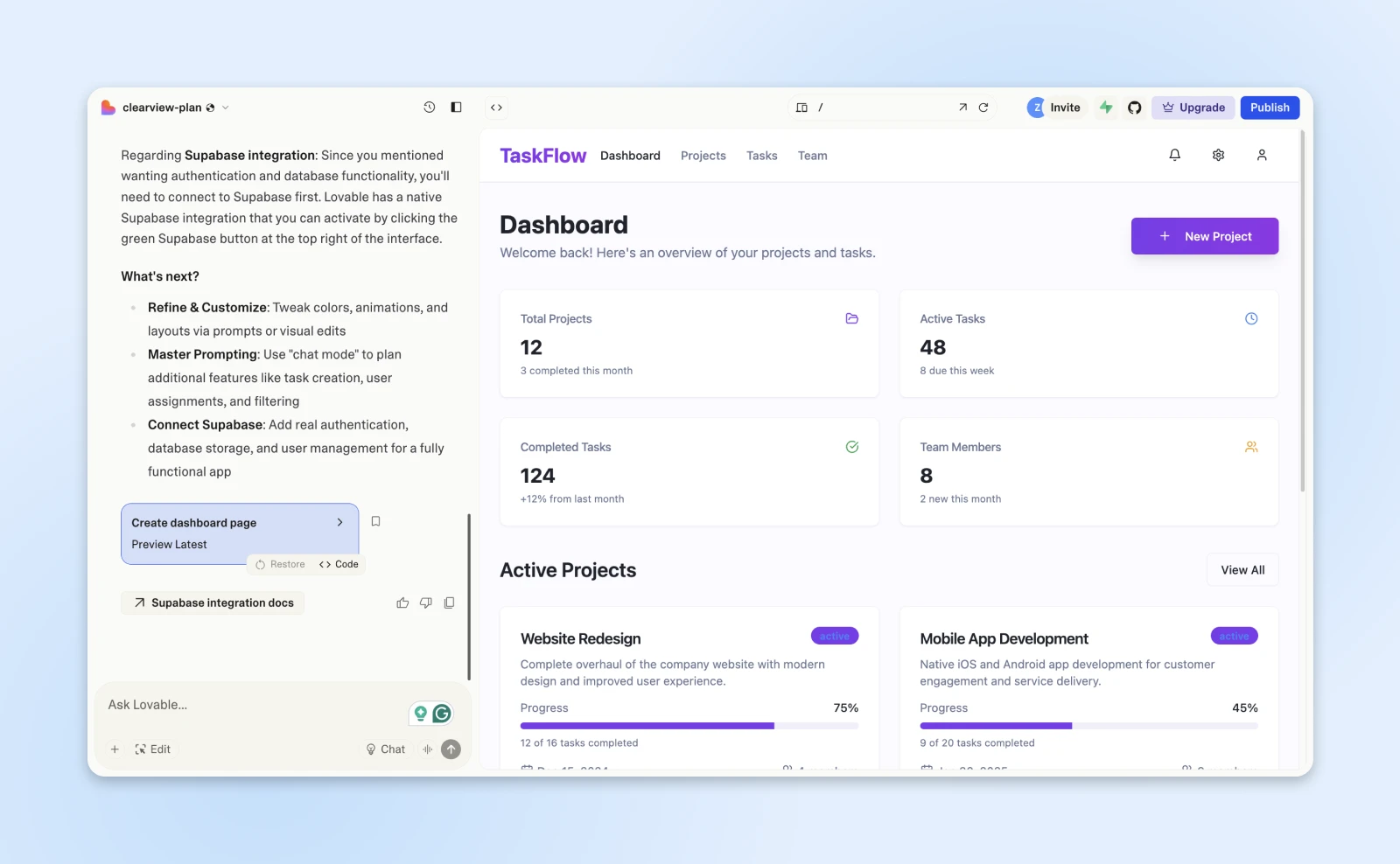
If you’re a developer, don’t look at the raw code unless you want to cringe.
But for non-technical folks, Lovable’s usability is unrivaled. We particularly like the “Edit” function, which lets you click on any individual element in the preview and ask for changes.
Those adjustments aren’t always executed perfectly, but that’s forgivable.
Pros:
- Create and edit full apps with prompts alone.
- Built-in deployment and hosting solution.
- Good first-pass execution for simple web apps.
Cons:
- Expensive for production use.
- Not the best portability.
- Less fine control than any other tool on this list.
Pricing: Free plan with 5 build credits per day, capped at 30 per month; paid plans from $25/month.
Also in this category: Bolt and Replit
Two more web-based builders now dominate this category, and you should know about both. Our scored, rubric-based tests date from October 2025, before these two earned their place on the shortlist — so instead of scorecards, here are the verified essentials:
Bolt: StackBlitz’s browser-based builder generates and hosts websites and apps from prompts. The free plan includes 1 million tokens per month (capped at 300,000 per day); the Pro plan starts at $25/month with 10 million tokens, custom domain support, and no Bolt branding (per bolt.new, August 2026).
Replit: The most complete platform of the bunch: Replit Agent builds full-stack apps with a built-in database, and publishing is baked in. The free Starter plan includes daily Agent credits and lets you publish one project; Replit Core starts at $25/month ($20/month billed annually) with $25 of monthly credits (per replit.com, August 2026).
And one to avoid: Base44
Testing Score: 35/70
For our review of Base44 (which Wix acquired in June 2025), let’s hand the mic to our Director of SEO, Brian Glassman, who tested it in October 2025:
“It’s a total walled garden, you can’t export code (even with paid plans). You have to publish on their servers. Yes, you can authenticate your domain, but it’s not enough.”
“Also, the output was frequently buggy. So many times I had to regenerate prompts for things to function correctly.”
So yeah, maybe look at some of the better options above?
Which vibe coding tool is right for you?
After testing 10 tools to their breaking point (and possibly ours) — nine full reviews, plus one to avoid — we’ve learned one thing: the best vibe coding tool is the one that matches your vibe.
Just as importantly, you don’t need to commit to one tool. In fact, we recommend mixing and matching to create the perfect workflow.
Here are some starter kits:
- If you don’t code but still want to design things: Start with v0 to rapidly generate pretty UIs. Then, if you need a full app with some basic logic, take your UI concepts and move to Lovable. It’ll help you stitch it all together and even get it online.
- If you’re at least vaguely technical and happy to work in VSCode: Use Cline for its smart planning and iteration, or Roo Code for its excellent project-wide context.
- When you need to tackle a more complex project: Fire up Cursor as your AI pair programmer. And if you need some extra juice to figure things out, use Claude Code as your super-smart CLI sidekick.
- If you’re an experienced developer who is happy to experiment: OpenCode is your playground. Experiment with Kilo for quick edits and UI polish.
The best free vibe coding tools
Want a $0 starting point? Here’s the cheat sheet, with free-tier details verified against each tool’s pricing page in August 2026:
- Cline, Roo Code, and OpenCode: Completely free, open-source tools. You only pay the API costs of whichever model you connect.
- Kilo: Free for individuals, and its gateway can route requests to free models.
- Cursor: The free Hobby plan includes limited Agent requests and access to Composer, Cursor’s in-house model.
- v0: Free plan with $5 of monthly credits and a 7-message/day limit.
- Lovable: Free plan with 5 build credits per day (up to 30 a month).
- Bolt: Free plan with 1 million tokens per month.
Can you export the code and host it yourself?
Here’s the question nobody asks until it’s too late: once the AI builds your app, where can it live?
- Editor and CLI tools (Cline, Roo Code, Kilo, Cursor, Devin Desktop, Claude Code, OpenCode): The code lives in your own files from the start. Push it to GitHub and deploy it anywhere, and it’s yours.
- v0: Portable. You can edit the code directly, and even the free plan syncs projects with GitHub.
- Lovable: Gets your app online fast, but portability was a weak spot in our test, so budget for some rework if you migrate.
- Base44: No code export, even on paid plans (as of our October 2025 test). You publish on their servers, or not at all.
If owning the finished product matters, favor the tools that leave the code in your hands. You can then run it on anything from DreamHost web hosting to DreamHost VPS hosting, and nobody can sunset your app out from under you.
Just be aware that these tools are divided between two payment systems.
API access vs. subscription-based tools
Some vibe coding tools run on API credits. Some use a subscription model.
There’s no wrong answer here. It’s basically the classic “buy vs. rent” debate, but for AI brainpower.
The rough math: BYOK tools bill you at raw provider rates per token (Kilo’s gateway, for example, passes through provider pricing with no markup), so light use costs pocket change, while long autonomous sessions can outrun a flat subscription. Subscription tools like Cursor bundle a set amount of model usage into a predictable monthly bill, then sell extra usage on top.
Here’s a quick comparison:
Choose API access if you…
- Read terms and conditions for fun.
- Know what an environment variable is (and you aren’t scared of it).
- Want to use the absolute latest models the second they drop.
- Have trust issues with subscription services.
👉 Examples: Cline, Roo Code, Claude Code.
Choose subscription tools if you:
- Break out in hives at the sight of configuration files.
- Want predictable monthly costs (your accountant will thank you).
- Prefer someone else to handle the technical plumbing.
- Appreciate a promise that holds up (like the unmetered bandwidth on DreamHost web hosting (with $0 overage fees)).
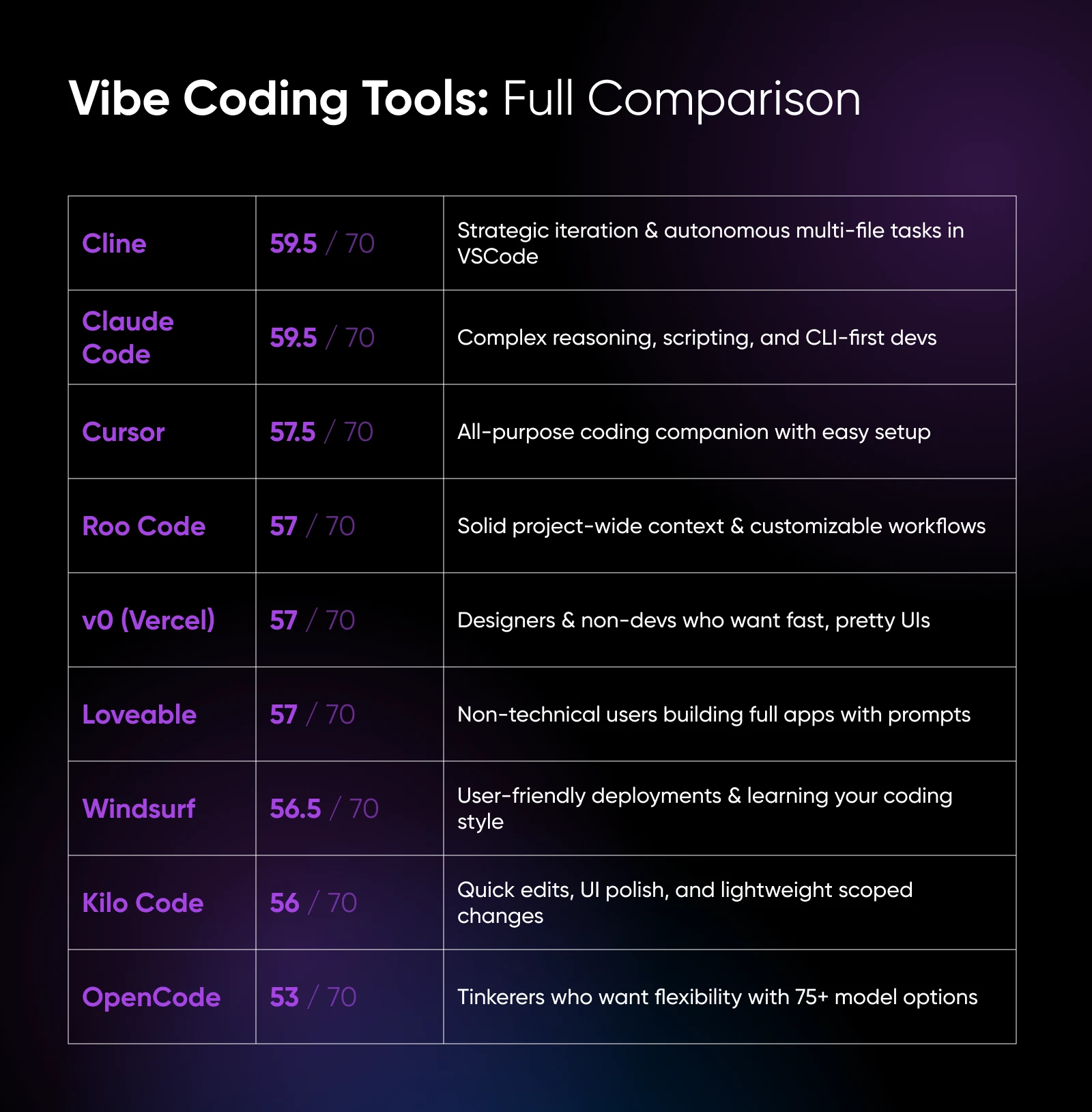
Prefer text to pixels? Here’s the full comparison, featuring scores from our October 2025 testing testing, pricing re-verified August 2026:
| Tool | Type | Score | Pricing model | Best for |
|---|---|---|---|---|
| Cline | IDE plugin | 59.5/70 | Free extension; BYOK API costs | Smart planning and iteration in VSCode |
| Claude Code | CLI | 59.5/70 | API credits, or with Claude Pro from $20/month | Complex reasoning in the terminal |
| Cursor | IDE fork | 57.5/70 | Free Hobby plan; paid from $20/month | The easiest all-round AI pair programmer |
| Roo Code | IDE plugin | 57/70 | Free extension; BYOK API costs | Project-wide context across many files |
| v0 (Vercel) | Web-based | 57/70 | Free tier; paid from $30/user/month | Beautiful front-end interfaces |
| Lovable | Web-based | 57/70 | Free tier; paid from $25/month | Full apps without touching code |
| Devin Desktop (formerly Windsurf) | IDE fork | 56.5/70 | Free plan; Pro from $20/month | Beginner-friendly IDE with easy deploys |
| Kilo | IDE plugin | 56/70 | Free for individuals; Teams from $15/user/month | Quick, scoped edits and UI polish |
| OpenCode | CLI | 53/70 | Free; BYOK API costs | Terminal power users who want any model |
| Bolt | Web-based | Not yet scored (added 2026) | Free tier; Pro from $25/month | Fast in-browser sites and apps |
| Replit | Web-based | Not yet scored (added 2026) | Free tier; Core from $25/month | All-in-one build, database, and publishing |
| Base44 | Web-based | 35/70 | Subscription only | The one we’d avoid |
The deep dive: vibe coding FAQs
Want to learn more about vibe coding? We’re happy to help.
Let’s start with the basics…
What is vibe coding exactly?
Vibe coding is basically asking AI to build software for you. That could mean anything from a simple calculator app to the next big SaaS.
The term came from Andrej Karpathy, one of the founders of OpenAI, the company behind ChatGPT. He coined it and showed what was possible in a February 2025 post on X.
AI enthusiasts quickly caught on. Interest exploded through 2025 — related searches jumped 6,700% in Q2 2025 alone, per Exploding Topics.
Is vibe coding legit or pure hype?
Some people say vibe coding is overhyped. It still takes technical skill to develop good software. But vibe coding techniques are having a measurable impact on software development and entrepreneurship.
Vibe coding seems to be the least popular with experienced developers:
- In Stack Overflow’s 2025 Developer Survey (published July 2025), 72% of developers said they don’t use vibe coding in their workflow.
- Only 3% of surveyed developers “highly trust” AI output, and just 2.6% of experienced developers do.
In spite of the downsides, a huge number of people are using vibe coding techniques to build software.
- In the same Stack Overflow survey, 84% of developers said they use or plan to use AI tools in their development process.
- Around a quarter of Y Combinator’s early-2025 cohort used AI to write 95% or more of their code, per Exploding Topics (July 2025).
So, who’s right? Here’s our verdict: vibe coding is legitimate for prototypes and scoped development work, but shipping its output without human review is reckless.
Vibe coding isn’t perfect. Even cutting-edge AI models make mistakes worthy of a million facepalms.
But if you’re not a coder or you want to whip up a working prototype, these tools make it possible to build something in hours rather than days.
And that’s good enough for us.
What is the best free vibe coding tool?
Cline, Roo Code, and OpenCode. All three are free, open-source tools — you only pay the API costs of whichever AI model you connect. If you’d rather work in a browser, v0, Lovable, and Bolt all offer limited free tiers, so you can experiment before spending a cent.
What’s the best AI model for vibe coding?
In our testing, Anthropic’s Claude models produced the strongest code: Claude powers both of our top scorers, Cline (which we ran with Claude under the hood) and Claude Code. That said, most BYOK tools let you switch models mid-project, so comparing for yourself is cheap.
Is vibe-coded software safe to ship?
Not without a review step. Treat AI-generated code like a pull request from an enthusiastic new hire: read it, run tests, and check dependencies for known vulnerabilities before it touches production. Code that works isn’t automatically code that’s secure, and AI will happily write both kinds.
How do you learn vibe coding?
By doing it. While there are online courses on vibe coding, the whole idea is that anyone can start, so pick a tool from the list above and build something small. A simple workflow that works with every tool on this list:
- Describe what you want, with context. Name the exact features, plus the languages and frameworks to use (not essential, but it helps).
- Generate, then actually read the result. Click through the app or scan the code before you pile on more prompts.
- Refine in a loop. Ask for one change at a time: small, specific prompts beat big vague ones.
- Talk to the AI about bugs. Paste the error message and ask for help resolving it.
- Validate before you ship. Test it, review the code, and check dependencies before real users touch it.
And if you get stuck, be sure to check out all the other AI guides on our blog!
Finding your vibe in vibe coding
Vibe coding tools aren’t a one-size-fits-all solution. Some shine at complex reasoning, others at clean design, and a few deliver the best value through open-source flexibility. Our testing showed that the “best” tool depends less on raw scores and more on what you actually need to build.
If you’re a designer, v0 or Lovable might feel like magic. If you’re comfortable in VSCode, Cline or Roo Code can speed up planning and project-wide edits. And if you’re an experimenter at heart, tools like OpenCode and Kilo give you the playground to explore.
The point is simple: vibe coding is here, it works, and it’s evolving fast.
Whether you’re building your first prototype or shaving hours off a dev sprint, the right tool is out there to match your vibe.

You Dream It, We Code It
Tap into 20+ years of development expertise. Just let us know what you want for your site – we’ll take it from there.
See More