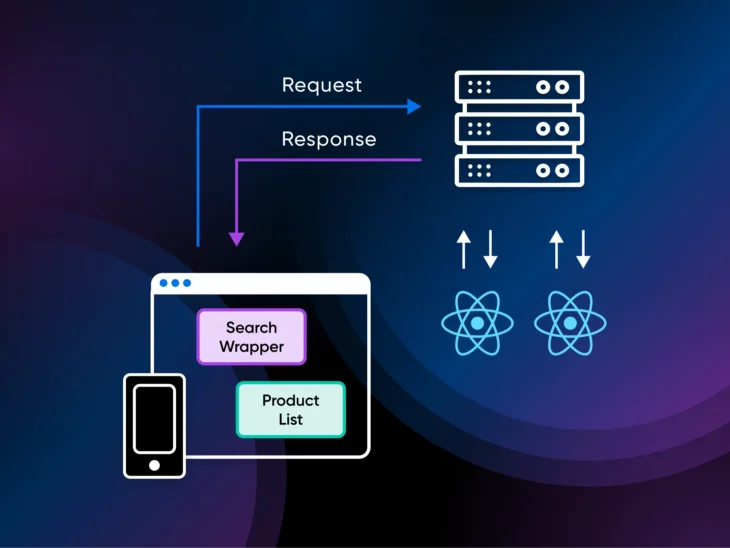
Here’s a myth worth busting: React components don’t have to run in the browser. React Server Components (RSCs) are React components that render on the server and send only their rendered output to the browser, shipping none of their own JavaScript. They became stable in React 19 (December 2024), and Next.js supports them out of the box.
React has been widely used to build web apps for more than a decade.
We’ve all seen it evolve from class components to hooks.
But React Server Components (RSCs)?
We don’t think anyone expected such a big change in how React worked.
So, what exactly are React Server Components? How do they work? And what do they do that React couldn’t already do?
To answer all these questions, we’ll quickly go over the fundamentals. If you’re in need of a refresher, have a quick look at this guide on how to learn React as a beginner.
In this post, we’ll walk you through why we needed React Server Components, how they work, and some of the major benefits of RSCs.
Let’s get started!
What are React Server Components?
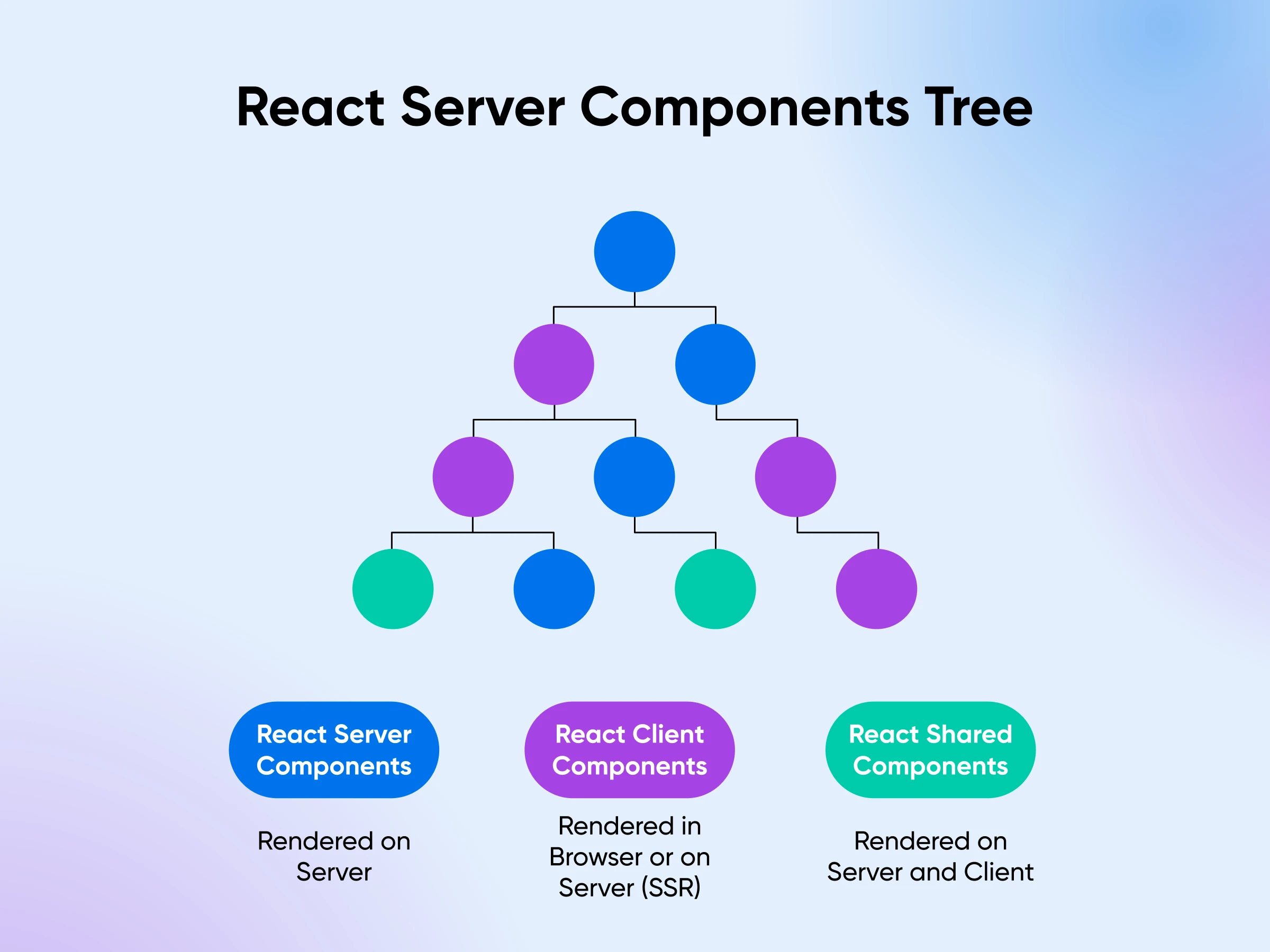
React Server Components are React components that render ahead of time on the server (either once at build time or on each request) instead of in the browser. Only their rendered output travels to the client, so they add zero JavaScript to your bundle and can read databases, files, and other backend resources directly.
“Server Components are a new type of Component that renders ahead of time, before bundling, in an environment separate from your client app or SSR server.” — the official React documentation
Since RSCs execute directly on the server, they can efficiently access backend resources like databases and APIs without an additional data fetching layer.
And “server” doesn’t always mean a machine answering live traffic. Server components can also run once at build time (reading files or pulling content from a CMS), so even a site with no web server at all can use them to keep heavy rendering libraries out of the client bundle (per the React docs).
API
An Application Programming Interface (API) is a set of functions enabling applications to access data and interact with external components, serving as a courier between client and server.
But why did we need RSCs anyway?
To answer this question, let’s rewind a bit.
Traditional React: client-side rendering (CSR)
React has always been a client-side UI library.
The core idea behind React is to divide your entire design into smaller, independent units we call components. These components can manage their own private data (state) and pass data to each other (props).
Think of these components as JavaScript functions that download and run right in the user’s browser. When someone visits your app, their browser downloads all the component code, and React steps in to render everything:
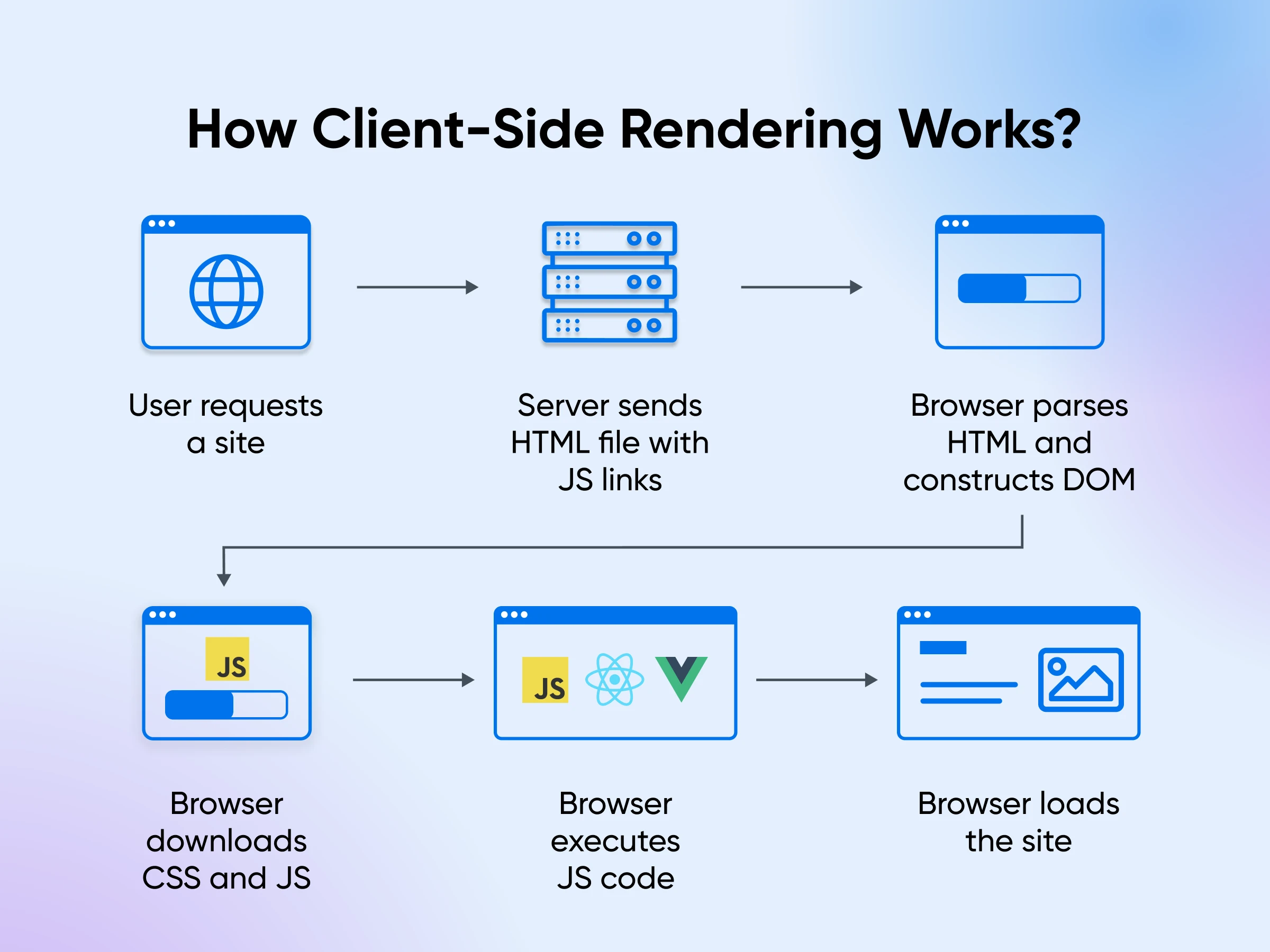
- The browser downloads the HTML, JavaScript, CSS, and other assets.
- React analyzes the HTML, sets up event listeners for user interactions, and retrieves any required data.
- The website transforms into a fully functional React application right before your eyes, and everything is done by your browser and computer.
While this process works, it does have some downsides:
- Slow load times: Loading times can be slow, particularly for complex applications with lots of components since now the user has to wait for everything to be downloaded first.
- Bad for search engine optimization (SEO): The initial HTML is often barebones — just enough to download the JavaScript which then renders the rest of the code. This makes it hard for search engines to understand what the page is about.
- Gets slower as apps grow larger: The client-side processing of JavaScript can strain resources, leading to a rougher user experience, especially as you add more functionality.
The next iteration: server-side rendering (SSR)
To address the issues caused by client-side rendering, the React community adopted Server-Side Rendering (SSR).
With SSR, the server handles rendering the code to HTML before sending it over.
This complete, rendered HTML is then transferred to your browser/mobile, ready to be viewed, so the app doesn’t need to be compiled during runtime like it would without SSR.
Here’s how SSR works:
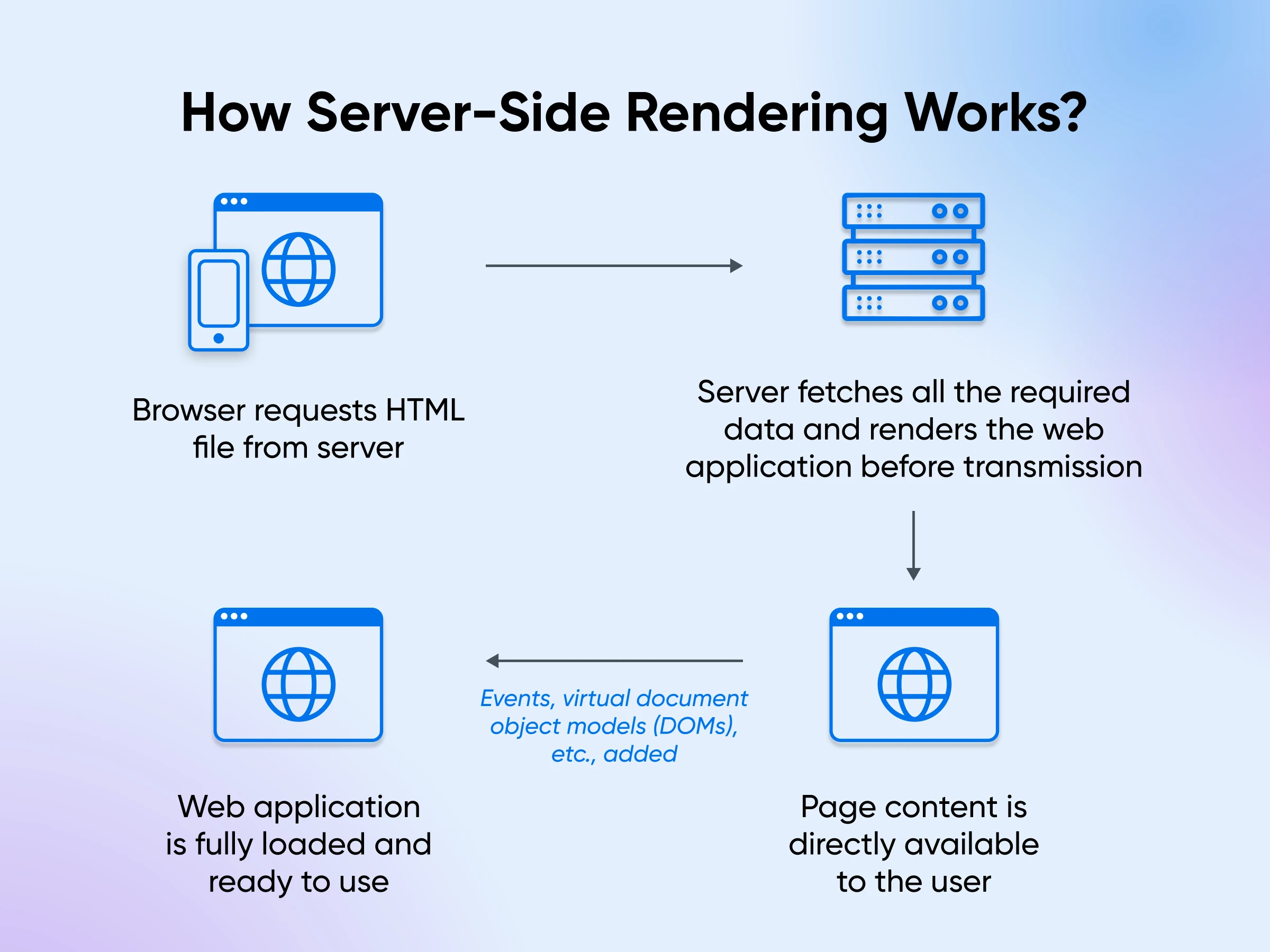
- The server renders the initial HTML for each request.
- The client receives a fully formed HTML structure, allowing for faster initial page loads.
- The client then downloads React and your application code, a process called “hydration,” which makes the page interactive.
The HTML structure rendered on the server has no functionality yet.
After the JavaScript downloads, React “attaches” your components’ logic to the HTML the server generated. In the React team’s own words, hydration “turns the initial HTML snapshot from the server into a fully interactive app that runs in the browser.”
Why does SSR work so well?
- Faster initial load times: Users see the content almost instantly because the browser receives fully formed HTML, eliminating the time required for the JavaScript to load and execute.
- Improved SEO: Search engines easily crawl and index server-rendered HTML. This direct access translates to better search engine optimization for your application.
- Enhanced performance on slower devices: SSR lightens the load on a user’s device. The server shoulders the work, making your application more accessible and performant, even on slower connections.
SSR, however, caused a number of additional problems, calling for an even better solution:
- Slow Time to Interactive (TTI): Server-side rendering and hydration delay the user’s ability to see and interact with the app until the entire process is complete.
- Server load: The server needs to do more work, further slowing down response times for complex applications, especially when there are many users simultaneously.
- Setup complexity: Setting up and maintaining SSR can be more complex, especially for large applications.
How do React Server Components work?
React Server Components are now a stable, production-ready part of React. They shipped with React 19 on December 5, 2024, and Next.js builds on them by default in its App Router, which is the main way developers use RSCs in production today. But they started life back in December 2020, when the React team introduced “Zero-Bundle-Size React Server Components” as a research project.
This changed not only how we thought about building React apps but also how React apps work behind the scenes. RSCs solved many problems we had with CSR and SSR.
One thing RSCs don’t do is replace server-side rendering. Server components render to a serialized description of the UI rather than finished HTML. That output can still be server-side rendered to HTML for a fast first paint, and it can be re-fetched from the server later without wiping out client-side state (per the React docs). Think of them as teammates: SSR handles the initial HTML, while RSCs decide which components ship JavaScript at all.
“[Server Components] are rendered before your application is bundled, and can pass data and JSX as props to Client Components.” — the React documentation
Let’s now look at the benefits that RSCs bring to the table:
1. Zero bundle size
RSCs are rendered entirely on the server, eliminating the need to send JavaScript code to the client. This results in:
- Dramatically smaller JavaScript bundle sizes.
- Faster page loads, particularly on slower networks.
- Improved performance on less powerful devices.
Unlike SSR, where the entire React component tree is sent to the client for hydration, RSCs keep server-only code on the server. This leads to those significantly smaller client-side bundles we talked about, making your applications lighter and more responsive.
2. Direct backend access
RSCs can interact directly with databases and file systems without requiring an API layer.
As you can see in the code below, the courses variable is fetched directly from the database, and the UI prints a list of the course.id and course.name from the courses.map:
async function CourseList() {
  const db = await connectToDatabase();
  const courses = await db.query('SELECT * FROM courses');

  return (
    <ul>
      {courses.map(course => (
        <li key={course.id}>{course.name}</li>
      ))}
    </ul>
  );
}
This is simpler in contrast to traditional SSR, where you’d need to set up separate API routes for fetching individual pieces of data. It’s also safer by default: because this component’s code never leaves the server, your database credentials and queries never reach the browser.
3. Automatic code splitting
With RSCs, you also get more granular code splitting and better code organization.
React keeps server-only code on the server and ensures that it never gets sent over to the client. The client components are automatically identified and sent to the client for hydration.
And the overall bundle becomes extremely optimized since the client now receives exactly what’s needed for a fully functional app.
On the other hand, SSR needs careful manual code splitting to optimize performance for each additional page.
4. Reduced waterfall effect and streaming rendering
React Server Components combine streaming rendering and parallel data fetching. This powerful combination significantly reduces the “waterfall effect” often seen in traditional server-side rendering.
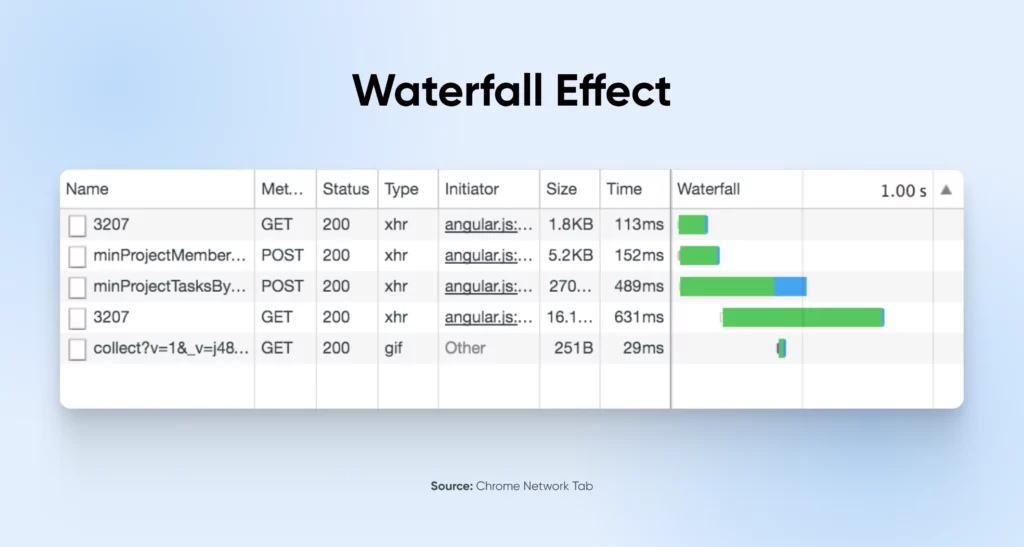
Waterfall effect
The “waterfall effect” slows down web development. Basically, it forces the operations to follow one another as if a waterfall were flowing over a series of rocks.
Each step must wait for the previous one to finish. This “wait” is especially noticeable in data fetching. One API call must be completed before the next one begins, causing page load times to slow.
Streaming rendering
Streaming rendering offers a solution. Instead of waiting for the entire page to render on the server, the server can send pieces of the UI to the client as soon as they’re ready.
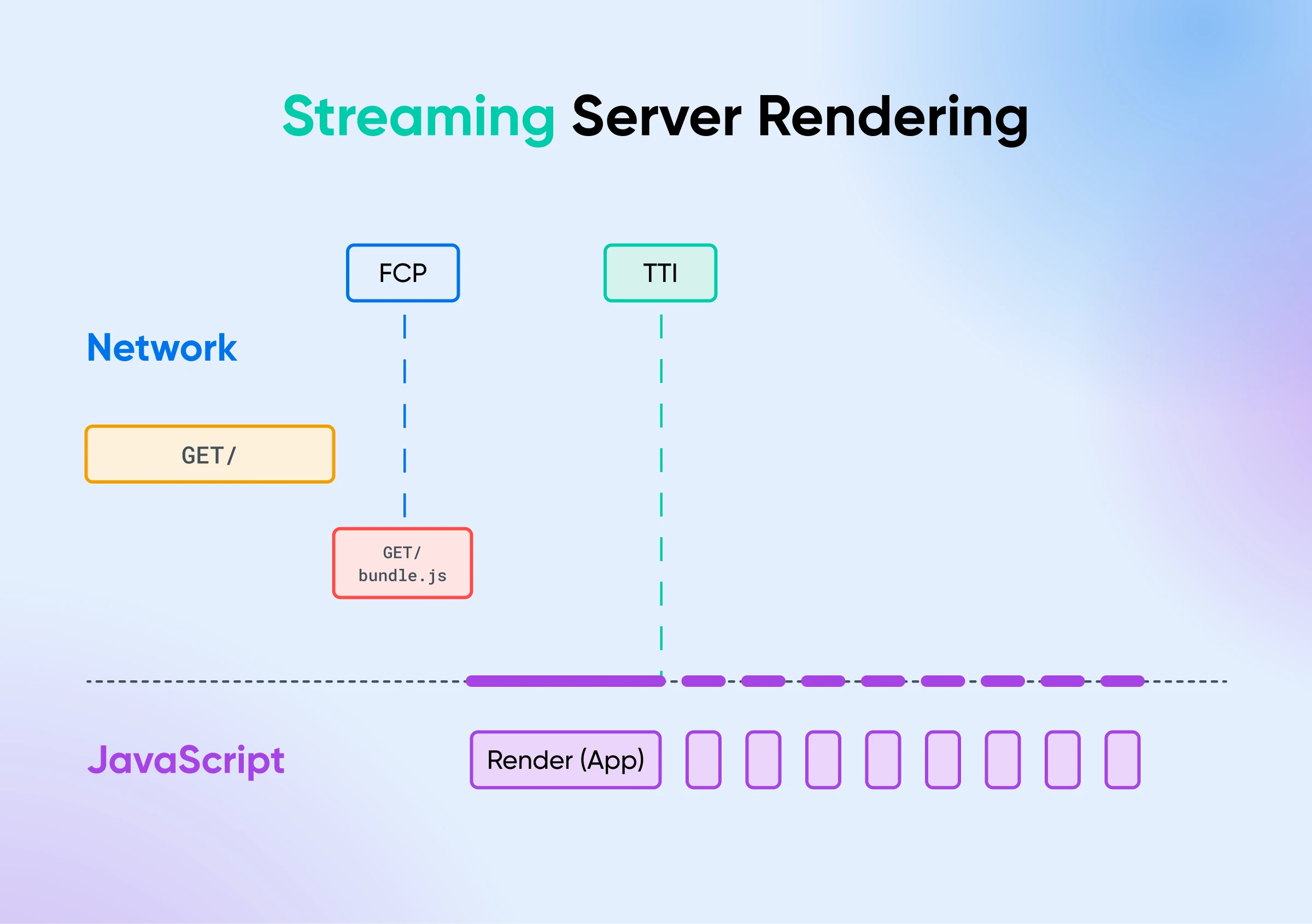
React Server Components make rendering and fetching data much smoother. They create multiple server components that work in parallel, avoiding this waterfall effect.
The server starts sending HTML to the client the moment any piece of the UI is ready.
So, compared to server-side rendering, RSCs:
- Allow each component to fetch its data independently and in parallel.
- The server can stream a component as soon as its data is ready, without waiting for other components to catch up.
- Users see the content loading one after the other, enhancing their perception of performance.
CSR vs. SSR vs. RSC at a glance
| CSR | SSR | RSC | |
|---|---|---|---|
| Where rendering happens | In the browser | On the server, then hydrated in the browser | On the server (build time or per request) |
| JavaScript sent to the client | The whole app | The whole app (for hydration) | Only client components |
| SEO | Weak — barebones initial HTML | Strong | Strong |
| Time to interactive | Slow on big apps | Delayed by hydration | Faster — less JavaScript to hydrate |
| Data fetching | From the browser, after load | On the server, often via API routes | Directly in the component, in parallel |
| Hydration | Not needed (full client render) | Entire component tree | Client components only |
5. Smooth interaction with client components
Now, using RSCs doesn’t necessarily imply that you have to skip using client-side components.
Both components can co-exist and help you create a great overall app experience.
Think of an e-commerce application. With SSR, the entire app needs to be rendered server side.
In RSCs, however, you can select which components to render on the server and which ones to render on the client side.
For instance, you could use server components to fetch product data and render the initial product listing page.
Then, client components can handle user interactions like adding items to a shopping cart or managing product reviews.
How do you mark a client component?
With the "use client" directive. In an RSC setup, every component is a server component by default. To make a component interactive, add "use client" at the top of its file, and React ships that component’s JavaScript to the browser:
"use client";

import { useState } from "react";

export default function AddToCart({ productId }) {
  const [added, setAdded] = useState(false);

  return (
    <button onClick={() => setAdded(true)}>
      {added ? "Added!" : "Add to cart"}
    </button>
  );
}
And you can drop it straight into a server component. The CourseList example from earlier could render <AddToCart productId={course.id} /> next to each course name: the list renders on the server, and only the button ships JavaScript.
The directive marks the boundary between the two worlds. Everything a "use client" file imports becomes part of the client bundle, while server components can pass data (and even rendered JSX) to client components as props, as long as those props are serializable (per the React docs).
One common misconception: there’s no directive for marking server components. "use server" doesn’t do that; instead, it marks server functions that client components can call. Server components need no directive at all; they’re the default.
Should you add RSC implementation to your roadmap?
Our verdict? RSCs add a lot of value to React development.
They solve some of the most pressing problems with the SSR and CSR approaches: performance, data fetching, and developer experience. For developers just starting out with coding, this has made life easier.
And this is no longer a bet on an experiment. React Server Components are stable in React 19 (the React team says they “will not break between minor versions”), and Next.js ships them out of the box. Other frameworks and bundlers are still building their integrations.
So, should you add RSC implementation to your roadmap? Our answer is still the dreaded it depends. But the maturity question is settled; what it depends on now is your framework and your app.
Where can you use RSCs today?
Only inside a framework that implements them. RSCs need bundler-level integration to work out which components run where and to serialize the server output, so you can’t drop them into a plain client-side React setup. In practice, that means Next.js’s App Router today, with other frameworks and bundlers adding support (the implementer-facing APIs are still evolving, per react.dev). If your app is a classic single-page React app, adopting RSCs means adopting one of these frameworks. It’s a migration rather than a switch you flip.
The trade-offs
RSCs aren’t free, and we’d be hyping if we pretended otherwise:
- No interactivity in server components: They can’t use state, effects, or browser APIs. Anything with a click handler has to be a client component.
- More to think about: You now decide where every component runs and what crosses the server/client boundary. That’s real mental-model overhead, especially for a team used to plain client-side React.
- Framework lock-in: Because RSCs only work through a framework’s implementation, you’re committing to that framework’s conventions and upgrade path.
- Sometimes they’re overkill: A highly interactive app behind a login (think dashboards) gains little, since almost everything needs to be a client component anyway.
Your app may be working perfectly fine without RSCs. In that case, adding another layer of abstraction may not do much. However, if you’re already on (or moving to) a framework that supports them, and bundle size or data fetching is a pain point, try making small changes and scaling from there.
What does an RSC app need from its hosting?
It depends on when your components render, and the React docs support both modes:
- Build-time rendering: If your server components run only at build time, the output is static files. Any host or CDN can serve it, and no live server is required.
- Per-request rendering: If components render on each request, you need an always-on server running a JavaScript runtime like Node.js. A static file host won’t cut it.
- Server resources: Moving rendering to the server means the server does the work your visitors’ browsers used to do. Budget CPU and RAM for your traffic, and leave room to scale.
And if you need a powerful server to test RSCs, spin up a DreamHost VPS.
DreamHost VPS hosting gives you full root access and unmetered bandwidth, so you can install Node.js and run whichever RSC framework you choose. Rather skip server maintenance altogether? DreamHost Managed VPS handles the upkeep for you.
FAQs about React Server Components
Are React Server Components the same as server-side rendering?
No. SSR renders your components to HTML for the first paint but still ships all their JavaScript for hydration. Server components never send their JavaScript at all, and their output can itself be server-side rendered. Most RSC frameworks use both together.
Are React Server Components stable?
Yes. RSCs shipped as stable in React 19 (December 2024), and the React team says they will not break between minor versions. Only the lower-level APIs for bundler and framework authors are still evolving.
Do I need Next.js to use React Server Components?
You need a framework or bundler with RSC support, and Next.js’s App Router is the most established option today. A plain client-side React setup can’t use them.
How do I deploy a React app that uses server components?
If everything renders at build time, upload the static output to any host or CDN. If components render per request, deploy to a server with a Node.js-compatible runtime (a VPS works well) and keep it running continuously.
Can server components replace my REST or GraphQL API?
Often, for your own app: server components read your data layer directly, no API routes needed, per the React docs. You’ll still want an API if other clients, like a mobile app or third-party integrations, need the same data.

When You Expect Performance Get DreamHost VPS
Big or small, website or application – we have a VPS configuration for you.
See More