What is a Tagline?
A tagline is a short, memorable phrase that sums up what a brand, website, or product is about, like Nike’s “Just Do It.” In WordPress, the tagline is a site-wide setting: a one-line description of your site that many themes display under the site title and that can appear in search results.
More About Taglines
Taglines do a specific job: they tell a stranger what you’re about in the time it takes to read one line. A good one is concrete enough to set expectations (“Fast, honest bike repair”) and short enough to remember. On a website, the tagline usually sits right next to your site’s name, so it works as a one-line pitch you write once and show everywhere.
Tagline vs. Slogan: What’s the Difference?
A tagline is the durable line attached to the brand itself, while a slogan is usually written for a specific campaign and retired with it. Nike’s “Just Do It” has represented the whole brand for decades; that’s a tagline. A line created for one product launch or one ad season is a slogan. In everyday use the two words overlap heavily, and plenty of marketers use them interchangeably; the brand-level vs. campaign-level distinction is the one that holds up most consistently.
Where Your WordPress Tagline Appears
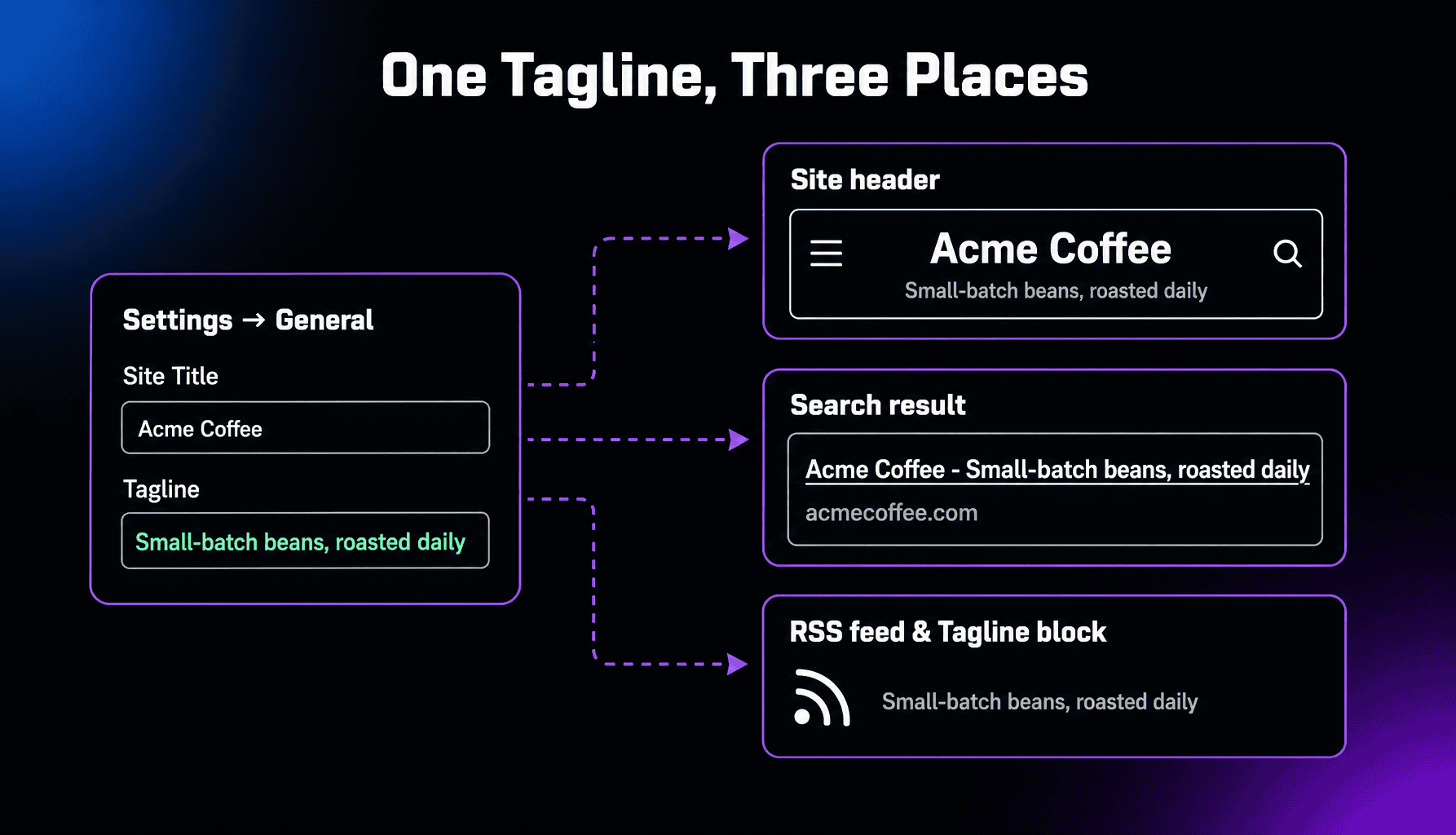
Your WordPress tagline can show up in a few places, depending on your theme and SEO setup. Many themes print it under or beside the site title, though some don’t display it at all. By default, WordPress also builds your homepage’s title tag from the site title plus the tagline, and it feeds your RSS channel description. Block themes add a Site Tagline block you can drop anywhere. If you run an SEO plugin like Yoast, it usually takes over the homepage title, so the tagline appears only where you’ve placed its template variable.
How to Change Your Tagline in WordPress
Go to Settings → General, edit the Tagline field, and save. This works on every theme. On block themes you can also edit it visually: in the Site Editor, select the Site Tagline block and type the new text. On classic themes, the same setting is available under Appearance → Customize → Site Identity. All three routes edit the same value, so change it in whichever place you’re already working.
How to Write a Tagline Worth Keeping
Pick one thing to say: what you do, who it’s for, or what makes you different. Then say it plainly. “Just another WordPress site” tells people you haven’t finished setting up; “Meal plans for new runners” tells them exactly why to stay. Keep it under about ten words, skip superlatives (“best,” “leading”), and read it aloud next to your site’s name, because that’s how visitors will encounter it. If your name already says what you do, use the tagline for the audience or the angle instead.
Frequently Asked Questions
Powerful WordPress Hosting
Reliable, lightning-fast hosting solutions specifically optimized for WordPress. Find the perfect plan for you by clicking below.
WordPress Hosting Plans