A thousand blog posts will tell you that WordPress is the answer. And they might be right.
WordPress is powerful, versatile, and completely free. Just over 41% of all websites run on the platform, per W3Techs (2026). We’re big fans, too.
But WordPress isn’t the only valid option. Not by a long streak.
Platforms like Squarespace, Webflow, and Ghost don’t get the same hype — but they all have their strengths. One of these alternatives could be the perfect fit for your project.
WordPress alternatives are website platforms that let you build and run a site without WordPress: site builders like Squarespace and Wix, AI builders like DreamHost’s Remixer, publishing tools like Ghost, and e-commerce systems like Shopify. The right choice comes down to seven factors, including capability, complexity, ownership, and cost.
The tricky part is narrowing down your options.
So instead of a generic comparison piece, this is a decision-making framework: honest platform breakdowns, the trade-offs that actually matter, and visual cheat sheets to help you decide.
What Makes a Website Platform Right for You? The Key Decision Criteria
For a problem that has so many possible solutions, it’s important to start with some decision criteria — yardsticks to measure the contenders.
We reckon there are seven key factors to consider.
Capability: Does the platform provide all the features that your business needs?
Complexity: Do you need a master’s degree just to publish a new blog post?
Ownership: How much control do you have over your site and its content?
Support: What kind of help can you access if something goes wrong with your site?
Design flexibility: Can you tweak your site to look exactly how you want?
Performance: Does your site work smoothly for every visitor?
Cost: How much money does it take to build and run your site?
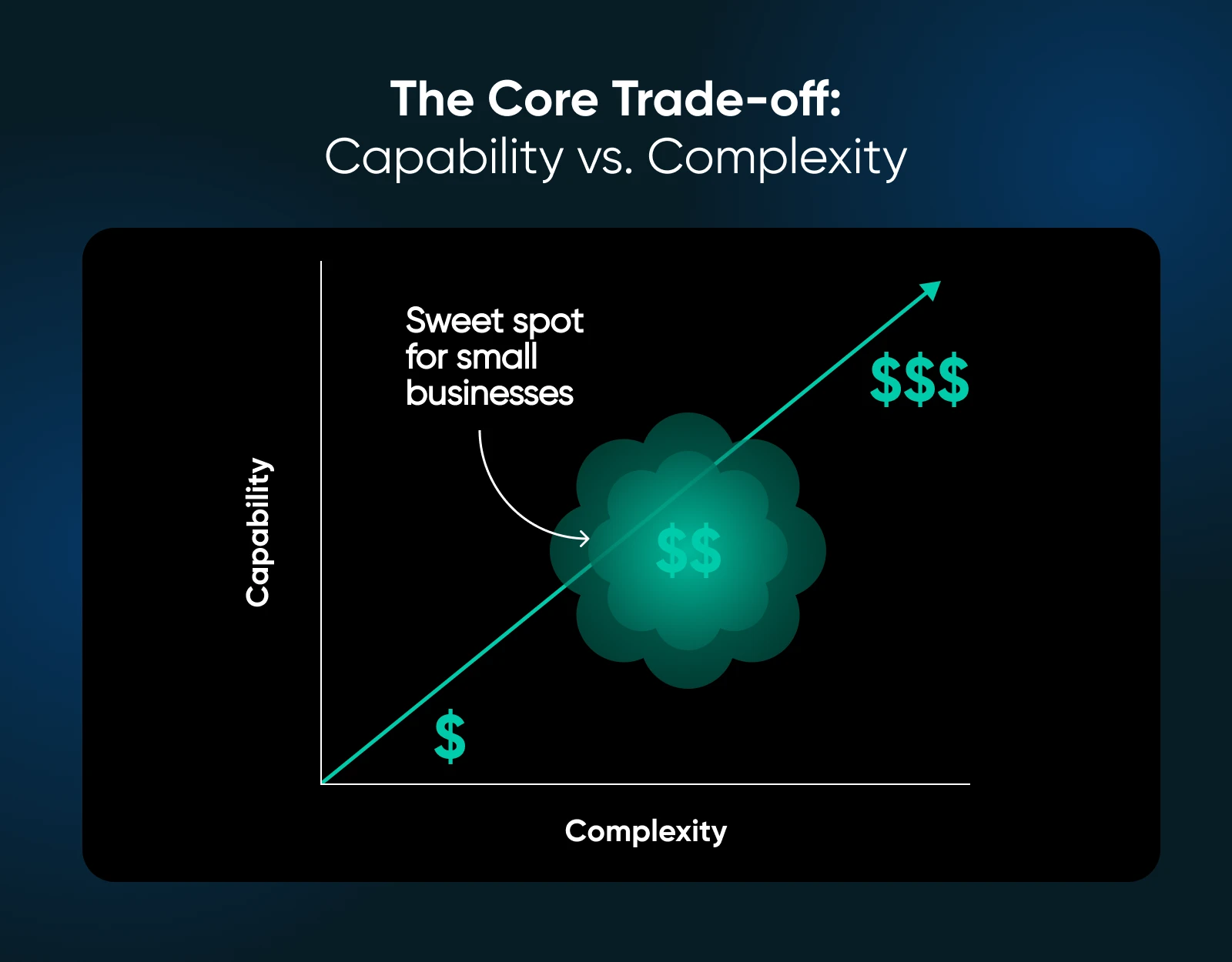
These factors aren’t all weighted equally. For most small businesses, the primary trade-off is between capability and complexity.
Having more capability means you can build a more effective website, but that may come at the cost of complexity, meaning you spend more time building and managing your site.
With this equation in mind, let’s take a closer look at the crowd favorite.
Why WordPress Might Work for Your Business Site
For most websites — most of the time — WordPress is a solid choice.
This platform was originally designed for blogging, but it can now handle a wide range of projects.
Much of this versatility is down to the WordPress plugin ecosystem: essentially a giant AppStore for your website. Most site owners take advantage, adding extra features with a couple of clicks.
WordPress is also well stocked on the design side, with thousands of themes to choose from. These templates allow you to reshape and customize your site without writing code.
The self-hosted version of WordPress is entirely free (apart from your hosting bill) and it gives you complete control over your content.
If you’re happy to sacrifice control and pay more for the sake of convenience, WordPress.com offers a fully hosted alternative.
Why You Might Not Want To Use WordPress
The versatility that makes WordPress so appealing is also its Achilles heel. Some would say it’s a Jack of all trades, master of none.
Make no mistake, though; WordPress is still a world-class publishing platform.
But for every other type of website, you’ll need to bend the platform to your needs — and ignore the features you don’t use.
Those extra features also add complexity. Anyone can set up a basic WordPress site in a few minutes, but building something more impressive requires a lot of learning.
As a result, many site owners use plugins as a shortcut. That’s fine in moderation, but installing a whole bunch of plugins can seriously dent performance, like putting rocks in your hiking backpack. It can also take a chunk out of your wallet; many plugins lock key features behind a premium license.
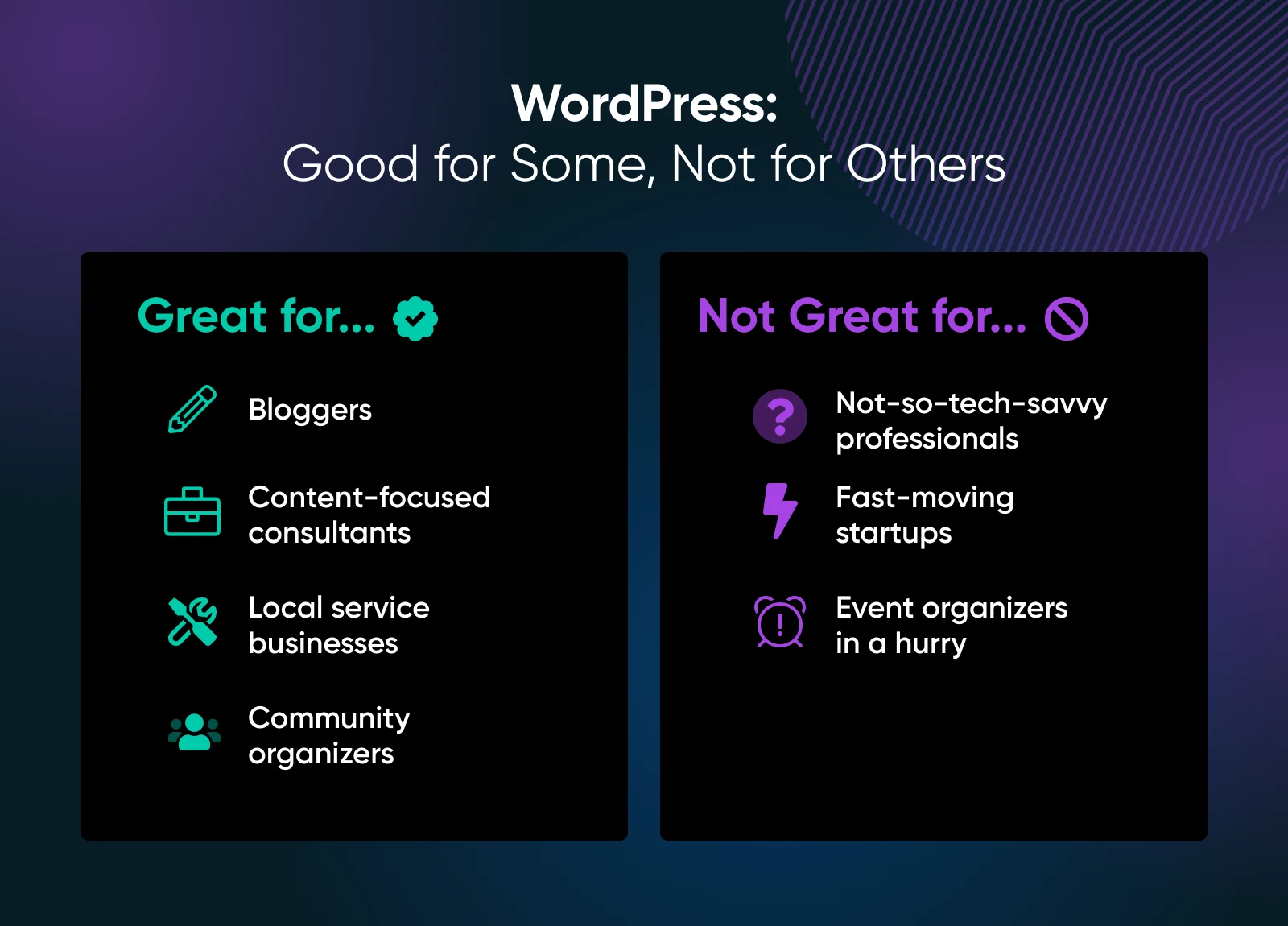
WordPress works well for:
Full-time bloggers: Publishing a consistent stream of long-form content is what WordPress was made for.
Content-focused consultants: If you use your blog to attract new clients, WordPress’ content management system and SEO tools are super helpful.
Local service businesses trying to scale: You can connect WordPress to a wide array of CRMs, booking systems, and local SEO tools.
The community organizer: Plugins make it easy to accept donations, create event calendars, and build member areas.
WordPress might not be the best choice for:
Tech-averse professionals: If your website is just for displaying your services, WordPress might be overkill.
Fast-moving startups: WordPress can’t match modern website builders when you need to make quick, radical design changes.
Event organizers in a hurry: WordPress can handle event listings, RSVPs, and ticket sales…but only with a small army of third-party plugins or custom code.
Sites that don’t change much: If your content stays the same for long periods of time, you could consider using a simpler CMS.
“Currently working on a site for my friend’s business and went with WordPress. It’s not nearly as scary as people think.” — crudeheadgearseller on Reddit
Which Are the Best WordPress Alternatives for Business Websites?
Still unsure what’s right for you? We hear you.
Luckily, there are loads of great alternatives to WordPress.
Browse the categories below and look out for something that matches your needs!
Basic Website Builders: Great for Simple Sites
Perfect for: Technophobicfreelancers and local business owners.
You don’t really like building websites. You just need to get something online quickly, with zero hassle.
That’s what simple website builders like Yola, Weebly, and Squarespace are designed for.
These platforms offer fairly limited features, but they are really easy to use. And you don’t even have to consider hosting.
The downside? You can’t extend your site or move it to other platforms later on. You’re also giving up control of your content; some platforms actually insert ads. And most are a bit pricey.
Yola: Super simple drag-and-drop templates. Solid speed when you have small visitor numbers.
Weebly: A more capable drag-and-drop site builder. Offers basic e-commerce and SEO features.
Squarespace: Template-based site builder. Relatively expensive, but the themes are oh-so-pretty.
Platform
Pricing
Key Features
Best For
Limitations
Yola
Free + paid plans
Super simple drag-and-drop templates; good speed for low traffic
Technophobic freelancers & local businesses
Limited features, little room to grow, can’t migrate
Weebly
Free + paid plans
Basic e-commerce, SEO, drag-and-drop builder
Easy setup with a few added capabilities
Somewhat limited customization, no migration
Squarespace
Paid plans (free trial)
Beautiful templates, template-based builder
Design-forward users who want polish fast
Expensive, limited extensibility, no plugin ecosystem
No-Code Platforms: Build Custom Websites Using Visual Tools
Perfect for: Site owners who want design freedom, without the tech headaches.
Maybe your web design ambitions stretch a little further. You want more pizzazz than the simple site builders can offer, but you still have zero interest in learning how to code.
That’s where no-code platforms like Remixer, Wix, Framer, and Webflow come in.
These tools offer intuitive visual editing tools, but with way more functionality than the basic builders. Most now use AI to generate your layout, and the newest agentic builders go further: describe what you need in plain language, and they build the whole site for you. (We compare that category in depth in our guide to website builders.)
The catch? These platforms can get pricey once you want premium features or e-commerce capabilities. Some won’t allow you to export your site, and you might still run into limits if you want super custom design.
Remixer (free to start): DreamHost’s agentic AI website and app builder. Describe what you need in your own words, and Remixer builds it — hosting included.
Wix: AI-driven site builder with a huge “app market” for extra features.
Framer: Design-focused AI site builder that creates layouts from text prompts, and lets you adjust the details by hand.
Webflow: Powerful visual design tool. Gives you almost complete freedom.
“Website builders like Wix or Squarespace are fine for basic sites, quick setup, no headaches, good for mom-and-pop shops with zero tech skills.” — StunningBanana5709 on Reddit
Platform
Pricing
Key Features
Best For
Limitations
Remixer
Free to start
Agentic AI builder: describe your site or app and it builds it, hosting included
Business owners who want a working site without the learning curve
Newer ecosystem; not self-hostable like WordPress
Wix
Free + paid plans
AI-driven builder, large app marketplace
Users who want flexibility without coding
Premium features add up, some design limits, no export option
Framer
Free + paid plans
AI generates layouts from prompts, manual editing possible
Fast-start designers who want control later
Limited advanced customization, no exports
Webflow
Free + paid plans
Visual design freedom, nearly full layout control
Creative users who want pixel-perfect design
Steeper learning curve, higher tiers get pricey
Get Content Delivered Straight to Your Inbox
Subscribe now to receive all the latest updates, delivered directly to your inbox.
Alternative Blogging Platforms: More Ways To Publish Content
Perfect for: Writers, journalists, and content creators.
A blogger not using WordPress…what kind of witchcraft is this?!
Actually, it makes a lot of sense.
If you’re focused on creating and sharing great content, something more streamlined can really speed things up. Platforms like Ghost and Medium allow you to concentrate on your craft.
Just be aware from the start that these tools are not designed for sites with loads of features. If you’re planning to add more down the line, choose something more versatile.
Ghost (hosted, or free if you self-host): Lightweight publishing platform, built specifically for writers and newsletter creators. We love it…we’re even featured on their site. 🫶
Medium (free, with an optional paid membership): Essentially, a social network for blogs. That makes it easy to reach new readers, but you’re getting a profile rather than a standalone website.
WordPress.com (free and paid plans): Wait a second…aren’t we looking at WordPress alternatives? This version is more like a service, based around the WordPress CMS. It’s fully hosted (convenient), but you will have to play by Automattic’s rules (less convenient, quite limiting).
Platform
Pricing
Key Features
Best For
Limitations
Ghost
Paid hosted plans; free self-hosted
Built for writers and newsletters. Lightweight, fast, and focused.
Content creators who want full control
Requires setup if self-hosted; smaller plugin ecosystem
Medium
Free; optional paid membership
Blog-based social network with built-in audience
Writers focused on reach and visibility
No standalone site; limited customization
WordPress.com
Free + paid plans
Hosted version of WordPress. Easy to start, managed infrastructure
Beginners who want WordPress without setup
Platform restrictions, less flexibility
E-Commerce Website Platforms: Specialized Tools for Selling Online
Perfect for: Online store owners, and anyone else who takes digital orders.
Running an online store is hard work, and it’s actually quite different from managing a regular website.
You need product pages, inventory tracking, shopping carts, and ways to take payment — and that’s just the basics.
Dedicated e-commerce platforms, like Shopify and Square Online, provide easy access to these features and many more.
Just be aware that these tools are made solely for e-commerce.
If you’re ever likely to publish blog posts or create a portfolio, you might be better off using something like Ecwid to add e-commerce to an existing website.
Shopify (paid plans; extra transaction fees unless you use Shopify Payments): The most popular hosted e-commerce solution. Robust features, extensive app ecosystem.
Square Online (free to start with transaction fees): Actually a version of Weebly, which is owned by payment processor, Square.
Ecwid (free plan available): Lets you add a store to your existing website, which is a nice compromise. If you stick with WordPress, you can add Ecwid to any site on DreamHost web hosting plans — Ecwid’s free plan covers up to five products.
“Shopify is robust and the way to go if you’re tech savvy at all. Using it without a lot of extra apps will keep the monthly fee reasonable.” — blockbeta on Reddit
Platform
Pricing
Key Features
Best For
Limitations
Shopify
Paid plans (transaction fees unless you use Shopify Payments)
Full-featured hosted e-commerce platform with massive app ecosystem
Serious online sellers
Higher cost, limited control over backend
Square Online
Free (with transaction fees)
Simple e-commerce via Weebly, tightly integrated with Square POS
Small businesses or in-person sellers
Limited design/customization flexibility
Ecwid
Free + paid plans
Add a store to any existing site; integrates well with WordPress, easy to set up
Site owners adding lightweight e-commerce
Limited standalone features unless upgraded
Marketing Website Builders: Optimized for Attracting New Customers
Perfect for: Any small business that wants to generate more leads online.
In theory, any website platform or CMS can be good for marketing, but some are made specifically for the purpose.
I mean…we’re really just talking about HubSpot’s Content Hub (formerly known as CMS Hub) here.
This hosted service syncs with the popular HubSpot marketing platform, allowing you to adapt your content to different audiences and enhance your CRM records with detailed web stats.
If that sounds like a foreign language, Content Hub might be more than you need. But it’s a worthy addition to our list.
Legacy CMS: Old School Platforms for Specific Needs
Perfect for: Established businesses with niche requirements, like community forums or data-heavy sites.
Ideally, you want a CMS that’s easy to use. But sometimes, functionality is even more important.
Some older systems, such as Joomla and Drupal, have a reputation for looking dated out of the box — though Drupal CMS, the modern relaunch introduced in 2025, has closed much of that gap. Where these systems really shine is handling large amounts of structured data. That makes them useful for running databases, directories, and forums.
These systems are also designed for self-hosting, which keeps costs low. Just don’t try using them unless you’re pretty confident with website management.
Joomla (free self-hosted): Structured content for communities. Solid portability, but support is entirely based on community forums.
Drupal(free self-hosted): Heavy customization for data-driven sites. Strong SEO tools. Demands technical know-how, though the newer Drupal CMS edition offers a friendlier setup.
“I’ve been using Joomla… great middle ground between simplicity of WP and complexity of Drupal.” — krileon on reddit
How To Choose the Right Platform for Your Business Site
When you started this post, you were hungry for information. We delivered a delicious six-course meal.
The tricky part is digesting it all…
To help you avoid the brain bloat, we’ve created some helpful cheat sheets.
These visual tools make it easy to compare different website platforms, based on the criteria that matter to you.
Complexity vs. Capability
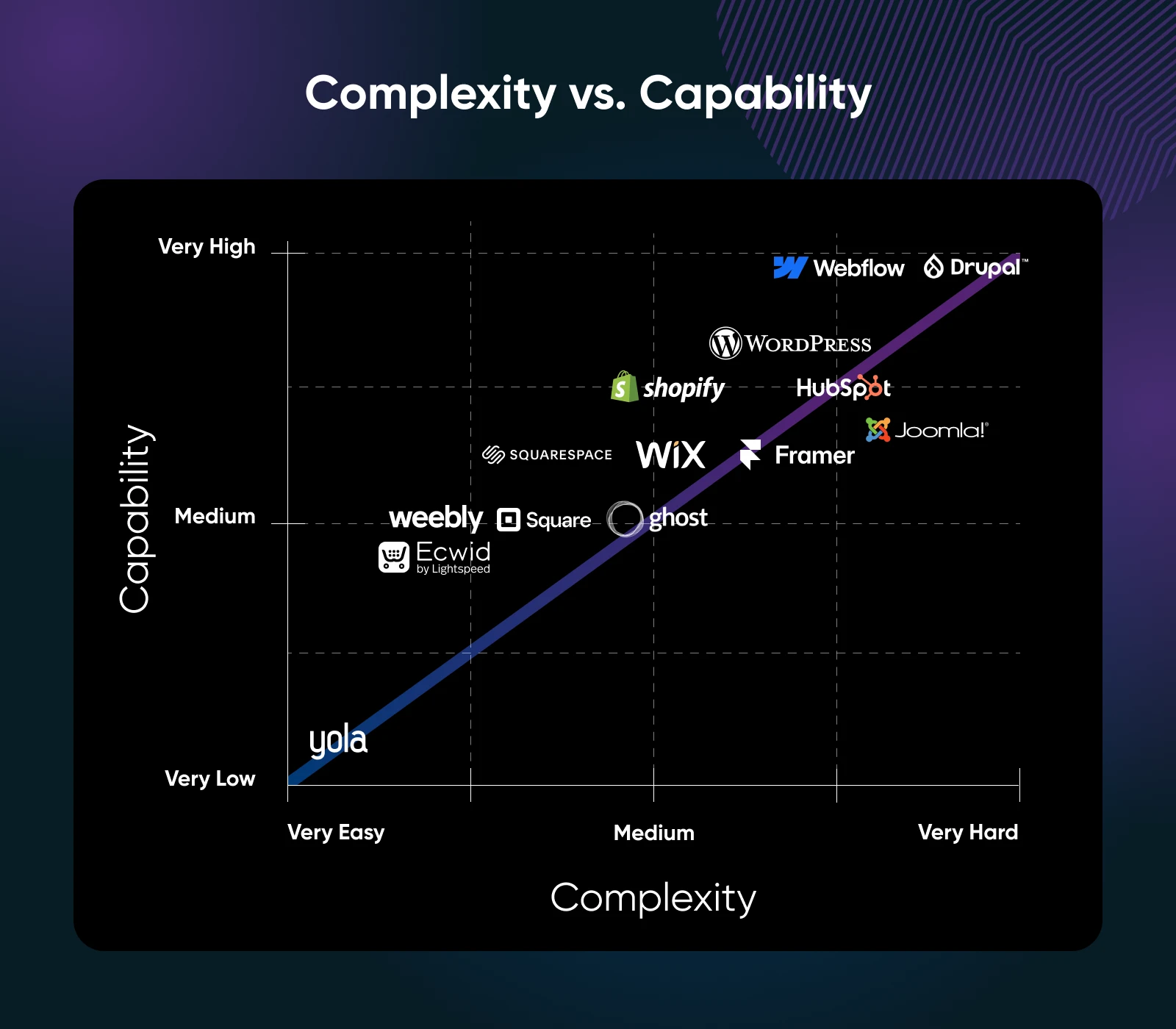
Let’s return to an old favorite — the trade-off between complexity and capability. Here’s how WordPress and the alternatives stack up:
“I want something very simple”: Yola, Medium.
“I’m willing to do some customization”: WordPress (both versions), Wix, Weebly, Squarespace.
“I fancy myself as a web designer”: Framer, Webflow.
“I need specific features, even if that means extra complexity”: Shopify, Ecwid, HubSpot CMS, Drupal, Joomla.
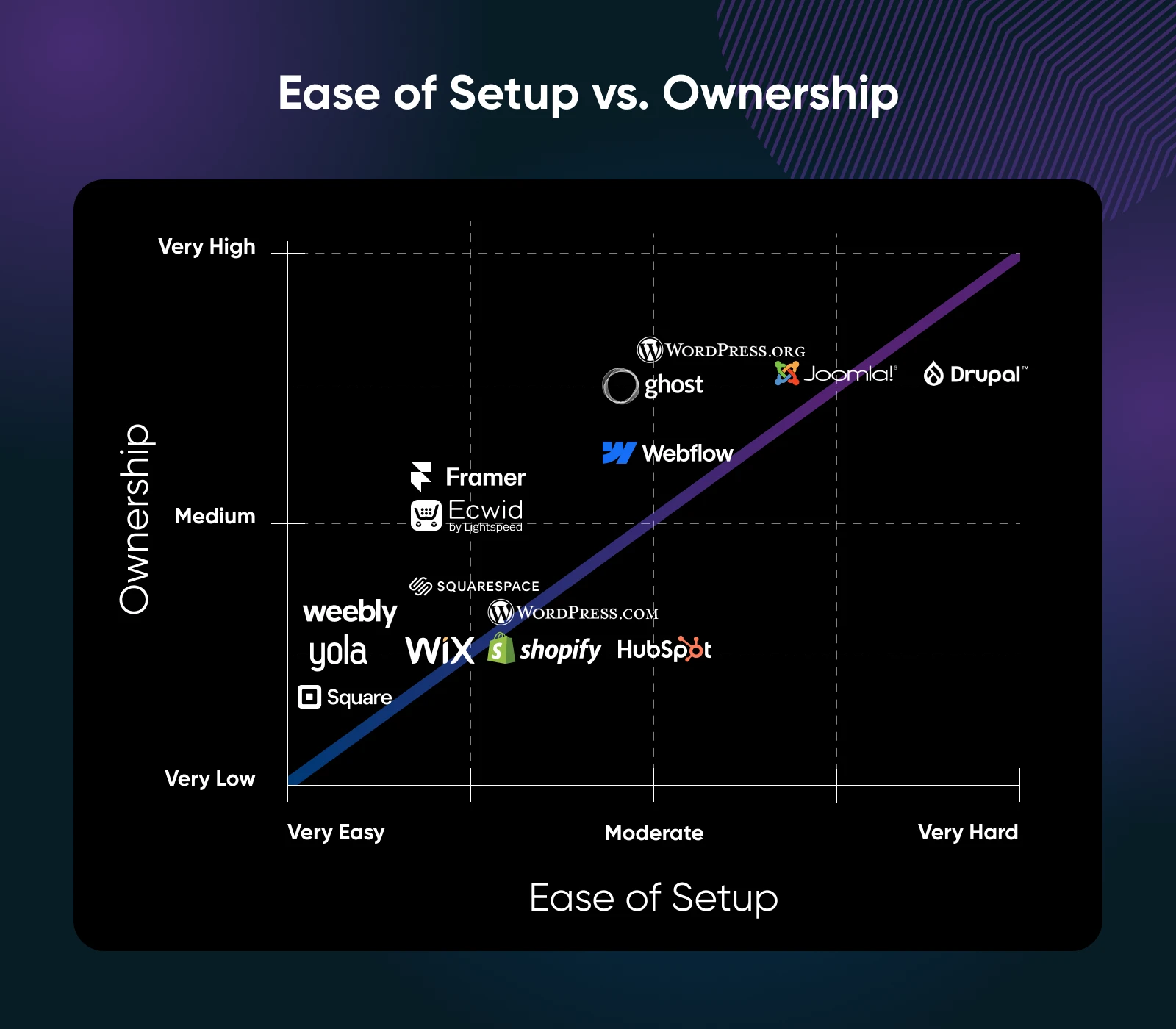
Ease of Setup vs. Ownership
Time is precious, but so is your content. This graph compares the ease of setup with the level of ownership you retain with each platform:
“I want to build a site as quickly as possible”: Yola, Medium, WordPress.com, Weebly, Square.
“I need total control over my site and content”: Self-hosted WordPress, Ghost, Joomla, Drupal, and possibly Webflow.
“I’m not that bothered by ownership, just need something easy to use”: Wix, Squarespace, Shopify, Ecwid, HubSpot CMS.
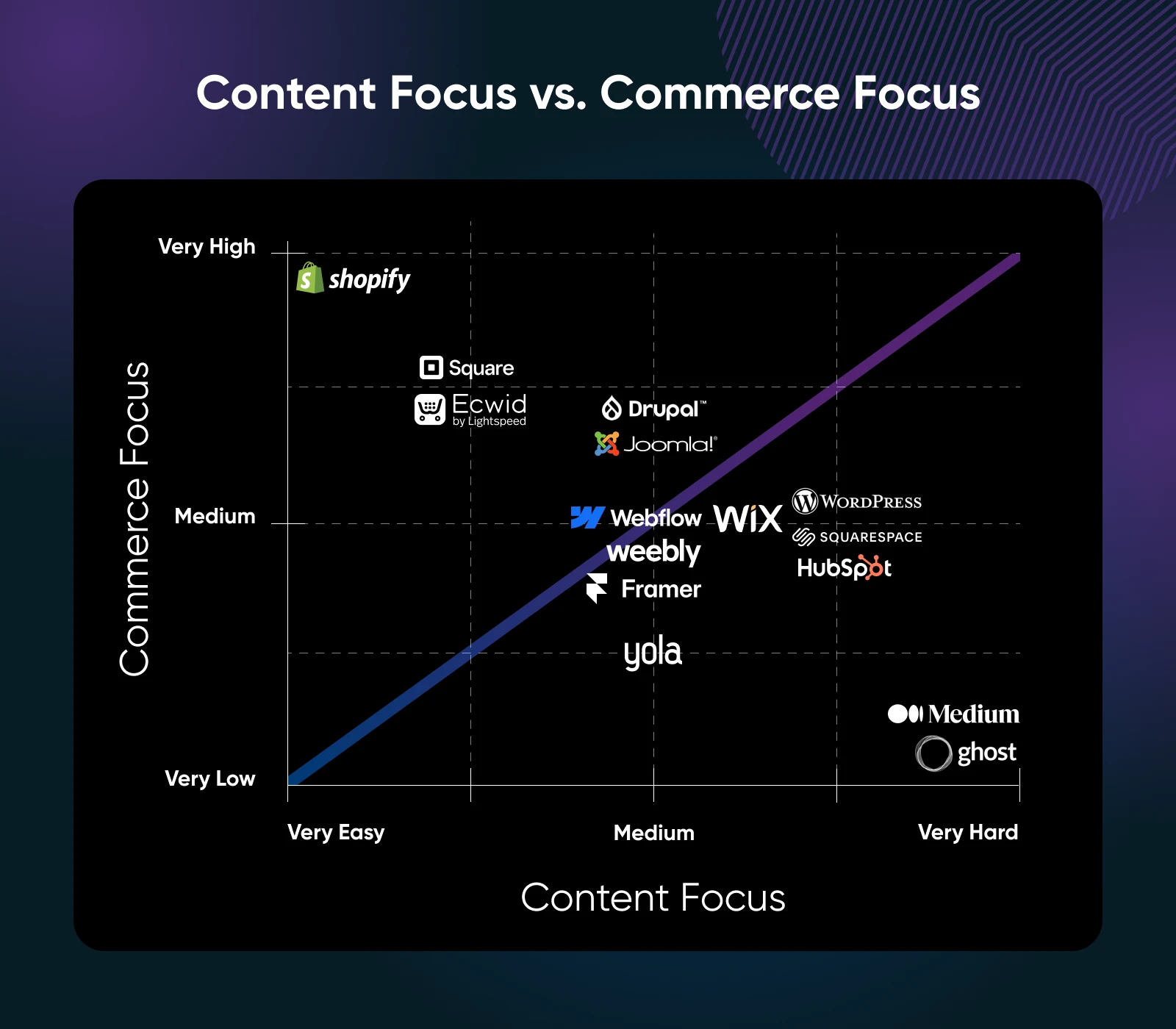
Content vs. Commerce
Some platforms are great for business. Others are good for content. Some fall somewhere in the middle.
This graph shows you where the contenders lie:
“I’m not bothered about business, I’m a content creator”: WordPress.com, Ghost, Squarespace, Medium.
“Show me the money”: Shopify, Ecwid, Square, HubSpot CMS.
“I’d like both bases covered”: Self-hosted WordPress, Wix, Weebly, Joomla, Drupal, Webflow.
WordPress Alternatives FAQ
Should a small business use WordPress or a website builder?
Use a website builder if you want a simple site online fast with minimal upkeep. Choose WordPress if you plan to grow into content marketing, custom features, or integrations — it trades convenience for capability and full ownership.
What is the best WordPress alternative for a small business?
It depends on the job. Squarespace and Wix suit simple service sites, while Webflow gives designers full control. For online stores, Shopify is purpose-built. Remixer builds a complete site from a plain-language description. Match the platform to your main goal, not the hype.
How do website builders compare to WordPress for blogging?
WordPress and Ghost are stronger for serious blogging: better content management, categories, SEO control, and portability. Website builders handle an occasional company blog just fine, but frequent publishers usually outgrow their editing and organization tools.
Are there self-hosted alternatives to WordPress?
Yes. Ghost, Joomla, and Drupal can all be self-hosted for free, giving you the same full ownership as self-hosted WordPress. Ghost is the friendliest of the three; Joomla and Drupal reward technical confidence with more structured-data power.
It’s All About Finding Your Perfect Match
Shopping for website platforms is a bit like dating.
Many of the options are nice enough to spend an hour with, but the goal is to find the one. The solution that’s going to power your website for years to come, hopefully.
This is an important principle to keep in mind. There’s no one-size-fits-all app that suits everyone. That’s why we haven’t ranked the options; only you can do that!
For that reason, we highly recommend taking a few platforms for a test drive. Remember, even the paid ones usually offer free trials.
If you decide to choose a self-hosted CMS, consider launching your site with DreamHost. We offer one-click installers for a wide range of platforms, and expert 24/7 support to help you figure out the technical hiccups. And if you’d rather skip the platform question entirely, describe your site to Remixer and watch it build one for you.
John is the Director of Product (WordPress) at DreamHost. He is responsible for setting the product roadmap/vision, engaging with customers to understand their challenges to better help overcome them, and working with multiple teams to deliver and promote features and fixes that optimize the experience of creating and managing WordPress sites. Follow John on LinkedIn: https://www.linkedin.com/in/john-robison-77907330/